The Ultimate Guide to Digital Waivers for Activity Centers
Why Digital Waivers Matter More Than Ever
If you're running an activity park — whether it's a trampoline park, aqua park, ropes course, or climbing gym — waivers are non-negotiable. They protect your business legally and set expectations for guests. But how you handle waivers can make or break the guest experience.
The problem? Most parks still handle waivers the old way: guests arrive, stand in line, fill out paper forms (or struggle with clunky kiosks), and create bottlenecks right when excitement should be highest. This isn't just inconvenient — it's costing you money, reviews, and repeat visits.
The solution is pre-arrival digital waivers — a system where guests complete all paperwork at home before they ever step foot in your venue.
The Hidden Cost of Check-In Queues
Let's talk numbers. At a typical trampoline park:
- Average family size: 4 people
- Time to complete waivers on-site: 5-10 minutes per family
- Peak arrival window: 30 minutes before popular sessions
What happens next is predictable:
- Lines form and frustration builds
- Parents get stressed, kids get impatient
- Staff scramble to manage queues instead of welcoming guests
- Late arrivals miss session time they paid for
- Google reviews mention "long wait times"
One 3-star review mentioning waiver lines can cost you dozens of potential bookings. Guests research before they visit, and "check-in nightmare" stories spread.
What Pre-Arrival Waivers Actually Look Like
Pre-arrival digital waivers flip the entire model. Here's how they work:
Step 1: Book Online
Guest books a session through your website. During checkout, they're prompted to complete the waiver immediately.Step 2: Complete Waiver at Home
The guest fills out the digital waiver form on their phone or computer. No app download required — just a mobile-optimized web form.Step 3: Arrive Ready
When the guest arrives at your venue, their waiver is already signed and in your system. Check-in takes seconds: scan a QR code or give their name, and they're in.Result: What used to take 10 minutes now takes 10 seconds.
The Group Booking Game-Changer: Claim Links
Here's where it gets really powerful. Birthday parties and group bookings are your bread and butter — but they're also your biggest waiver headache.
The old way: Party host books for 15 kids. On arrival day, 15 different parents need to sign waivers for their children. The host doesn't have other parents' contact info or legal authority to sign. Chaos ensues.
The new way with claim links:
- Party host books the session and pays
- They receive a unique claim link to share with all attendees
- Each parent clicks the link, claims their children, and signs their own waiver at home
- On party day, every child is already signed in — the group walks straight to the party room
Technical Requirements for Digital Waivers
The legal enforceability of digital waivers varies by jurisdiction. However, a properly implemented system should capture the following:
Essential Elements
- Clear identification: The signer must be identifiable (name, email, sometimes signature)
- Consent capture: The guest must actively agree (checkbox, signature, or explicit action)
- Timestamp and IP logging: Record when and from where the waiver was signed
- Immutable storage: Waivers should be stored in a way that prevents tampering
- Accessibility: Guests should be able to request copies of their signed waivers
Guardian-Child Relationships
For venues serving minors, you need:
- Clear indication of who is signing (parent/guardian)
- The minor's information clearly linked to the signing adult
- Age verification where applicable
- Consent acknowledgment for the specific minors covered
Consult a Lawyer
This article provides general guidance, but waiver requirements vary by state and activity type. Have a local attorney review your waiver language annually. The investment is minimal compared to the protection it provides.
Walk-In Waivers: Handling the Exceptions
Even with the best pre-arrival system, you'll have walk-ins — guests who show up without bookings or completed waivers. Your system needs to handle these gracefully.
Best practices for walk-in waivers:
- Mobile-first kiosks: If you have waiver stations, make sure they're tablet-based with the same form guests use at home
- QR code signage: Post QR codes throughout your lobby that let guests complete waivers on their own phones
- Staff-assisted option: Train front desk staff to help guests complete waivers quickly on a shared device
- Same-day validity: Once signed, the waiver should cover the entire day (or longer, depending on your policy)
Waiver Integration with Your Booking System
Here's where many venues go wrong: they treat booking and waivers as separate systems.
Disconnected systems create problems:
- Guest books online, then has to complete waiver separately
- Staff manually check both systems at arrival
- Data doesn't sync (typos in names cause confusion)
- No single view of "is this guest ready to enter?"
Integrated systems solve everything:
- Waiver is embedded in the booking flow
- One database knows: did they book? did they sign? are they checked in?
- Staff see one manifest with waiver status for every guest
- Walk-ins can book and sign in one flow
When evaluating waiver solutions, ask: "Does this integrate with my booking, or is it a separate tool?" The answer matters more than almost any feature list.
The Staff Experience Matters Too
Your staff are the ones who deal with waiver headaches daily. A good digital waiver system should make their lives easier:
Front Desk Checklist
- ✅ Can they instantly see waiver status for any guest?
- ✅ Can they help a guest complete a waiver in under 2 minutes?
- ✅ Can they check in an entire group with one action?
- ✅ Do they stop answering the same waiver questions all day?
Manager Benefits
- ✅ Waivers are stored and searchable (no more filing cabinets)
- ✅ Reporting on completion rates and booking-to-waiver gaps
- ✅ Reduced training time for new staff
- ✅ Fewer guest complaints about check-in
Key Metrics to Track
Once you implement pre-arrival waivers, track these metrics:
Pre-Arrival Completion Rate
- Goal: 80%+ of guests complete waivers before arriving
- How to improve: Include waiver link prominently in booking confirmation email
Average Check-In Time
- Goal: Under 30 seconds per party
- How to measure: Time 20 random check-ins and average them
Waiver-Related Complaints
- Goal: Zero mentions of "wait times" or "check-in" in reviews
- How to track: Set up Google Alerts for your venue name + waiver/check-in keywords
Group Booking Waiver Completion
- Goal: 95%+ of party attendees have waivers signed before arrival
- How to improve: Send claim links automatically, remind hosts to share with guests
Common Mistakes to Avoid
Mistake 1: Too Many Fields
Every field on your waiver is friction. Ask yourself: do we legally need this, or are we just collecting data for its own sake?Keep: Name, date of birth, health acknowledgments, legal agreement
Question: Home address, how did you hear about us, marketing opt-ins
Mistake 2: Desktop-First Design
Over 80% of guests will complete your waiver on a mobile device. If your form was designed for desktop and "works" on mobile, it's not good enough. Mobile-first means:- Large touch targets
- Minimal scrolling
- Auto-advancing fields
- Mobile keyboard optimization (phone field shows number pad)
Mistake 3: No Confirmation
Guests complete the waiver and... nothing. They're left wondering if it went through. Always show a clear confirmation page and send an email/text confirmation.Mistake 4: Expired Waivers Not Handled
If your waivers expire annually, what happens when a returning guest's waiver has expired? Your system should:- Flag expired waivers before arrival
- Make re-signing quick and easy
Making the Switch: A Practical Timeline
If you're moving from paper or basic kiosks to pre-arrival digital waivers, here's a realistic timeline:
Week 1: Setup and Configuration
- Set up your digital waiver system
- Configure your waiver form with legal-approved language
- Integrate with your booking system
- Test the complete flow (book → waiver → arrive → check-in)
Week 2: Staff Training
- Train front desk staff on the new check-in flow
- Create quick reference guides for handling exceptions
- Set up signage (QR codes for walk-in waivers)
Week 3: Soft Launch
- Enable pre-arrival waivers for online bookings
- Keep kiosks available as backup
- Gather staff feedback daily
Week 4+: Full Rollout
- Make pre-arrival waivers the default for all bookings
- Phase out or reduce kiosk stations
- Monitor metrics and optimize
The ROI of Getting Waivers Right
Let's quantify the impact:
Time Saved
- 50 families × 8 minutes saved = 400 minutes per peak day
- That's 6+ hours of guest wait time eliminated
Staff Efficiency
- Fewer staff needed at check-in during peaks
- Existing staff can focus on hospitality, not paperwork
Revenue Impact
- Fewer late arrivals means more session time utilized
- Better reviews lead to more bookings
- Group bookings become easier, encouraging more parties
Risk Reduction
- Digital waivers are harder to dispute than paper
- Complete records with timestamps and digital signatures
- Easier to prove compliance if ever challenged
Choosing a Digital Waiver Solution
When evaluating options, ask these questions:
- Is it integrated with booking? Standalone waiver tools create friction.
- Does it support group claim links? Essential for birthday parties.
- Is it truly mobile-first? Test it on your phone before deciding.
- How is data stored? You need secure, accessible, long-term storage.
- What's the check-in experience? Observe the staff flow, not just the guest form.
- Can it handle walk-ins gracefully? Your system needs to flex for spontaneous visits.
What We Got Wrong: Who Is Actually Allowed to Sign
Added August 2026. When we first published this guide we treated a signed waiver as a solved problem. Collect it before arrival, store it properly, done. We have since learned that the hardest part is not collecting the signature. It is making sure the right person gave it.
None of what follows is legal advice, and enforceability varies a great deal between US states, but these are the four things we would tell our past selves.
A release for a child generally needs the parent or court-appointed legal guardian. Not the birthday host, not an aunt, not the neighbour who drove. If the signer had no legal authority over that child, you may be holding a document that does nothing, and you typically find out months after an incident. In a family entertainment center this is not a rare edge case, it is an ordinary Saturday.
Group waivers are weak twice over. One adult signing for eight children usually cannot cover the seven who are not theirs. And a form that shows a heading and a list of name fields reads like an attendance sheet, which makes it easy to argue the signer thought they were recording who was present rather than waiving each child's rights individually.
Look at the signature. A meaningful share of guests signing on a phone produce a dot, a smiley or a single line. The record still says "signed" and the status still turns green. Showing the drawn signature next to each name at check-in turns that into a thirty-second fix at the counter instead of a problem in a deposition.
Retention is longer than you think. In many jurisdictions the limitation period for a minor's claim does not start until they turn eighteen, so a claim can arrive fifteen or more years after the visit. You need to be able to produce that exact document years later and show it has not been altered since signing.
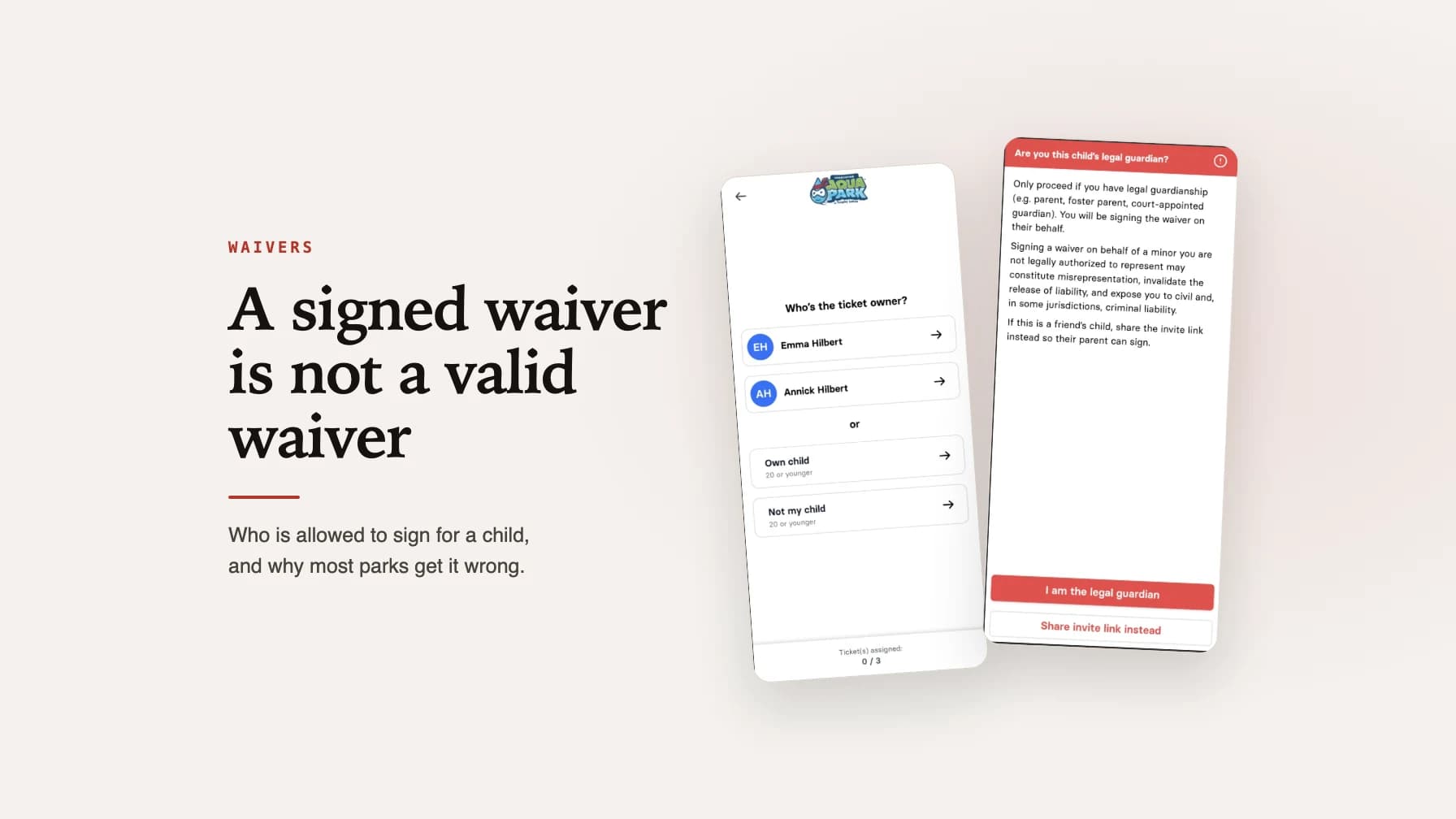
This changed the product as much as it changed our thinking. wakesys now asks explicitly whether a child is the signer's own, offers the invite link at every step so the actual parent can sign from their own phone, and warns clearly before anyone signs for a child they are not authorised to represent. The full write-up, with the screens and the reasoning, is here: a signed waiver and a valid waiver are not the same thing.
Conclusion: Waivers as a Competitive Advantage
Digital waivers aren't just about legal protection — they're about guest experience. When done right, they transform your most friction-filled moment (arrival) into a smooth, welcoming experience.
The parks that figure this out create a competitive advantage. While competitors are still dealing with waiver queues and stressed-out families, your guests walk straight to the fun.
Pre-arrival waivers with group claim links aren't the future — they're the present. The only question is whether you'll implement them now or continue losing guests to parks that already have.
wakesys offers integrated pre-arrival digital waivers with group claim links, built specifically for activity parks. Book a demo to see how it works.
Updated 8 August 2026: added the section on who is legally allowed to sign for a child, why group waivers are weak, checking the drawn signature at check-in, and how long a minor's waiver has to be retained. Originally published 1 December 2025.

Chris Hilbert
Founder, wakesys
Park operator and software founder. Running Charleston Aqua Park and building wakesys to help activity centers succeed.