Skip to content
Product changelog

What we've been shipping

Everything we've added or fixed, newest first. If it's on this page, it's already running in your park.

Book a Demo
Changes merged
320
Customer-facing
139
Listed here
109
Latest change
FixedBooking

Quantity fields count anything that is not a number as 0

If a guest or staff member types a letter, a fraction or a stray character into a quantity field, it now counts as 0 and is no longer read as some other amount. Pressing Enter right after typing now sends the number shown, not the raw text. This stops wrong quantities from reaching the cart.
Timeline

Everything we shipped

Newest first. Every entry links to the pull requests that delivered it.

November 2026

20 changes

FixedBooking

Quantity fields count anything that is not a number as 0

If a guest or staff member types a letter, a fraction or a stray character into a quantity field, it now counts as 0 and is no longer read as some other amount. Pressing Enter right after typing now sends the number shown, not the raw text. This stops wrong quantities from reaching the cart.
FixedBooking

Ticket quantity now stops at 500 per time slot

When choosing how many tickets to book for a time slot, online or at the till, the quantity now goes up to 500 at most, even when the slot has no seat limit. If someone types a bigger number, or more than the seats left, only the maximum is taken. This stops a mistyped number from ending up in the cart.

FixedPoint of sale

The menu and side panel now fit the screen on tablets

On tablets and phones, the main menu and the side panel at the till could be taller than the visible screen, so their lower part ended up behind the browser bar. They now end at the bottom edge of the screen, so everything in them is visible and you can tap all of it. This also applies to the menu in the admin area.

NewPoint of sale

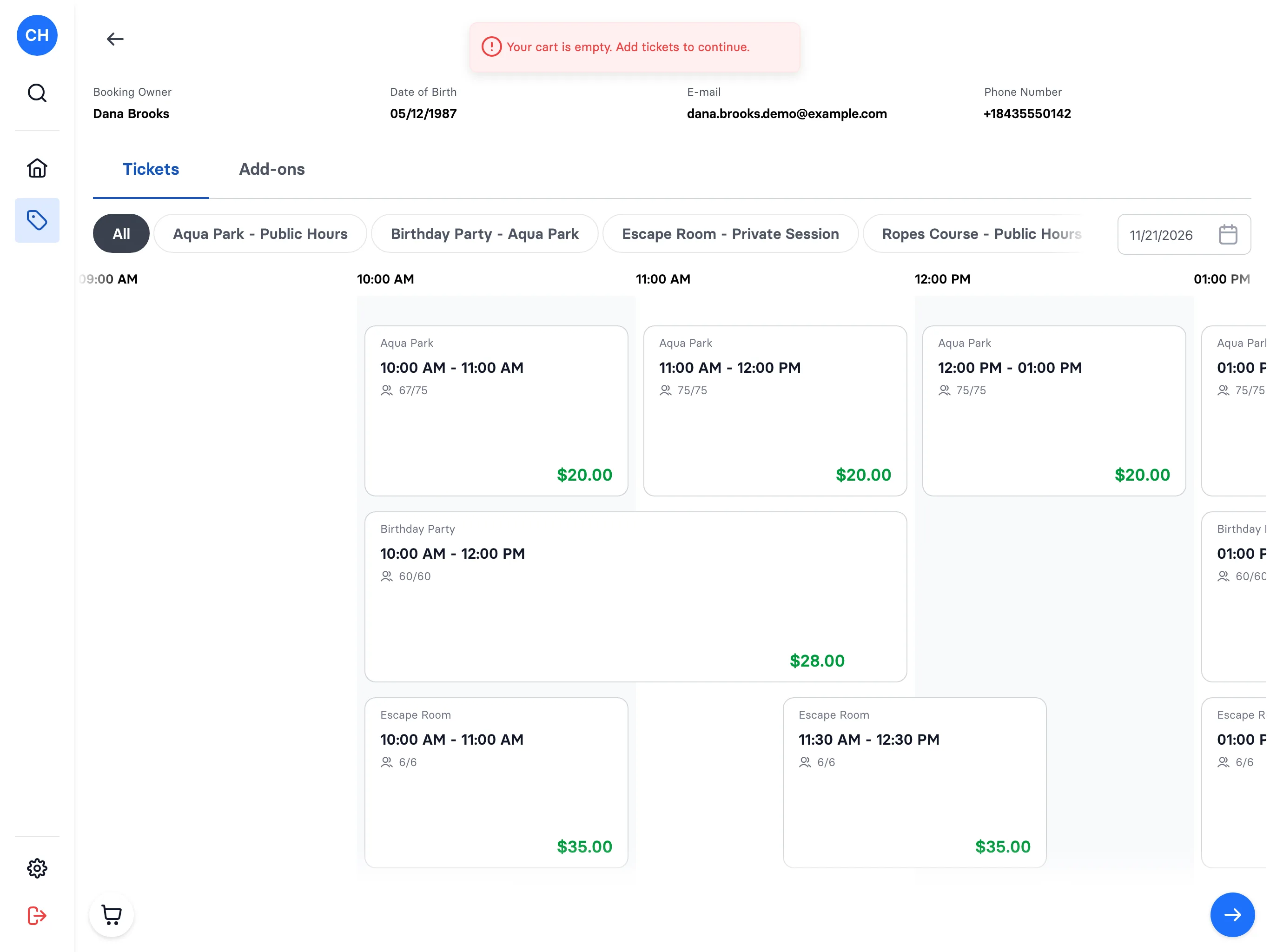
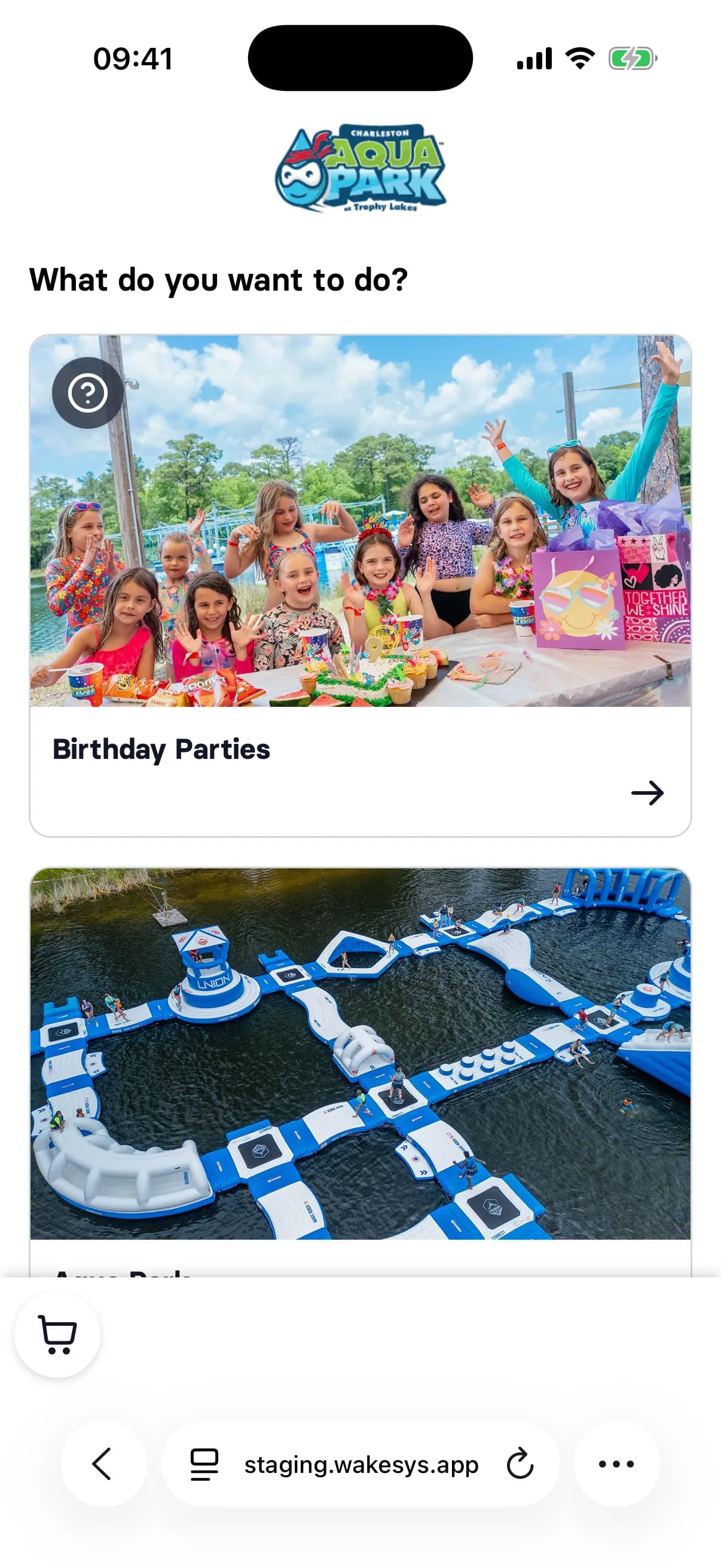
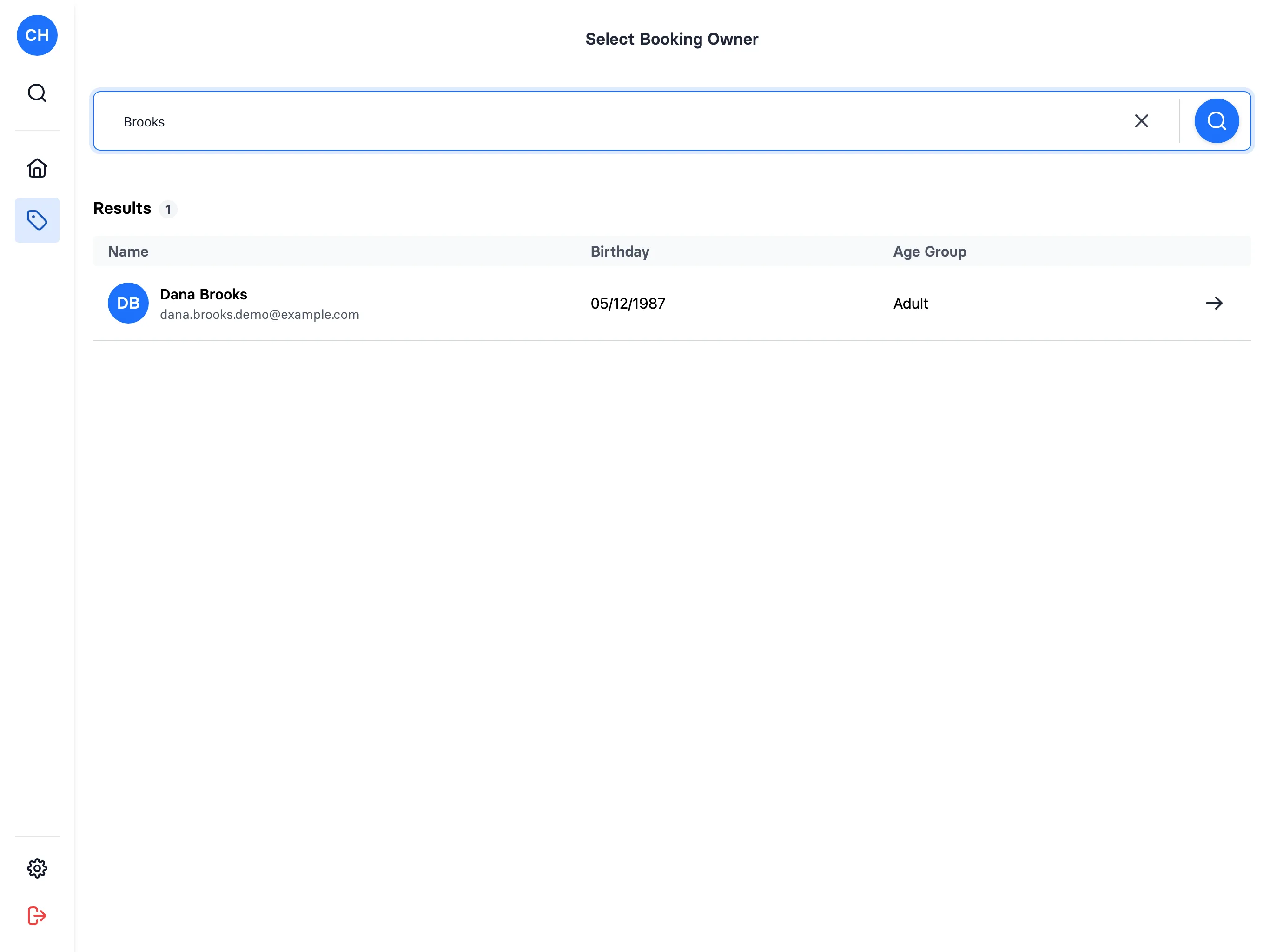
A new sale at the till, with a cart and named tickets

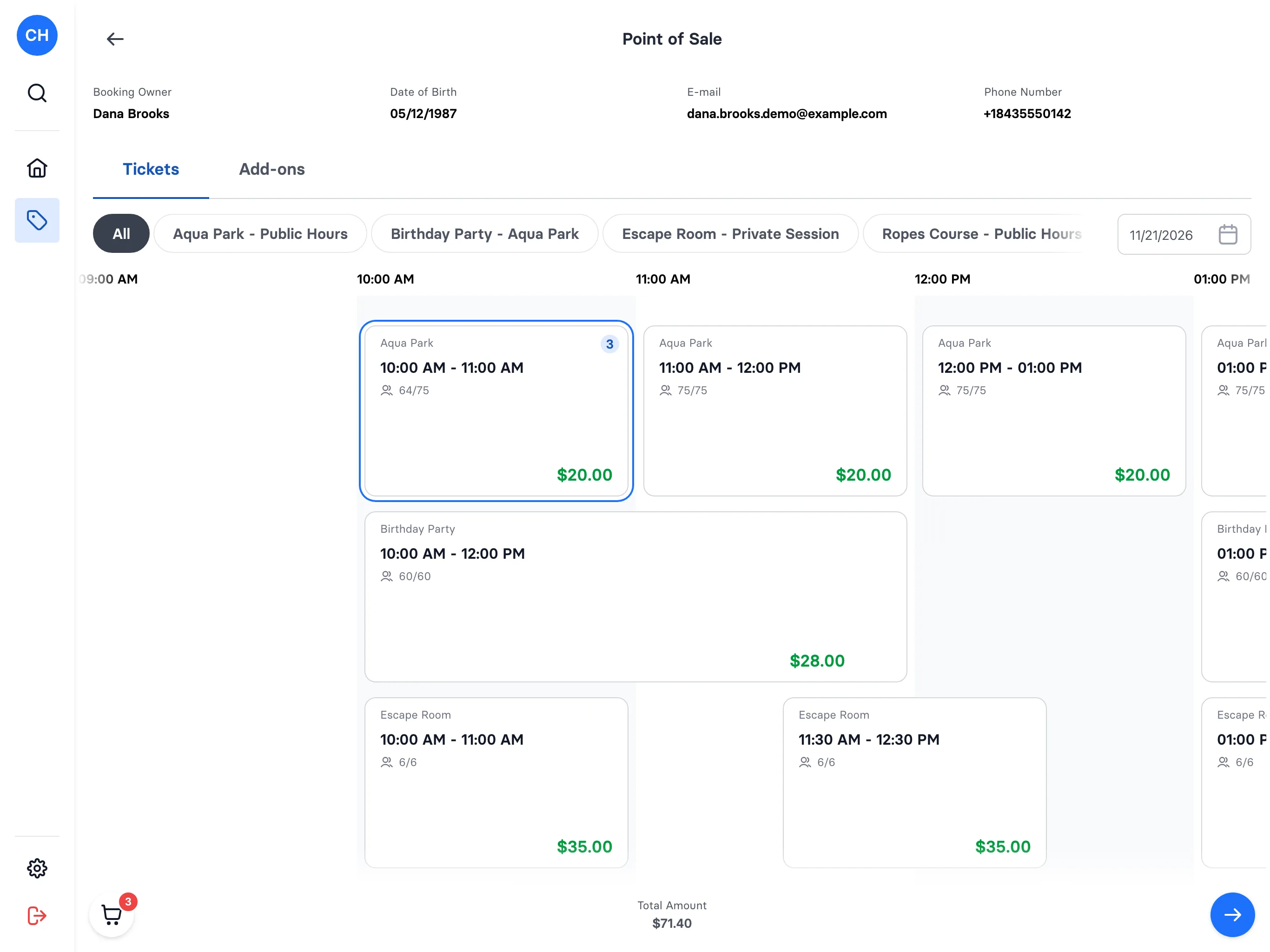
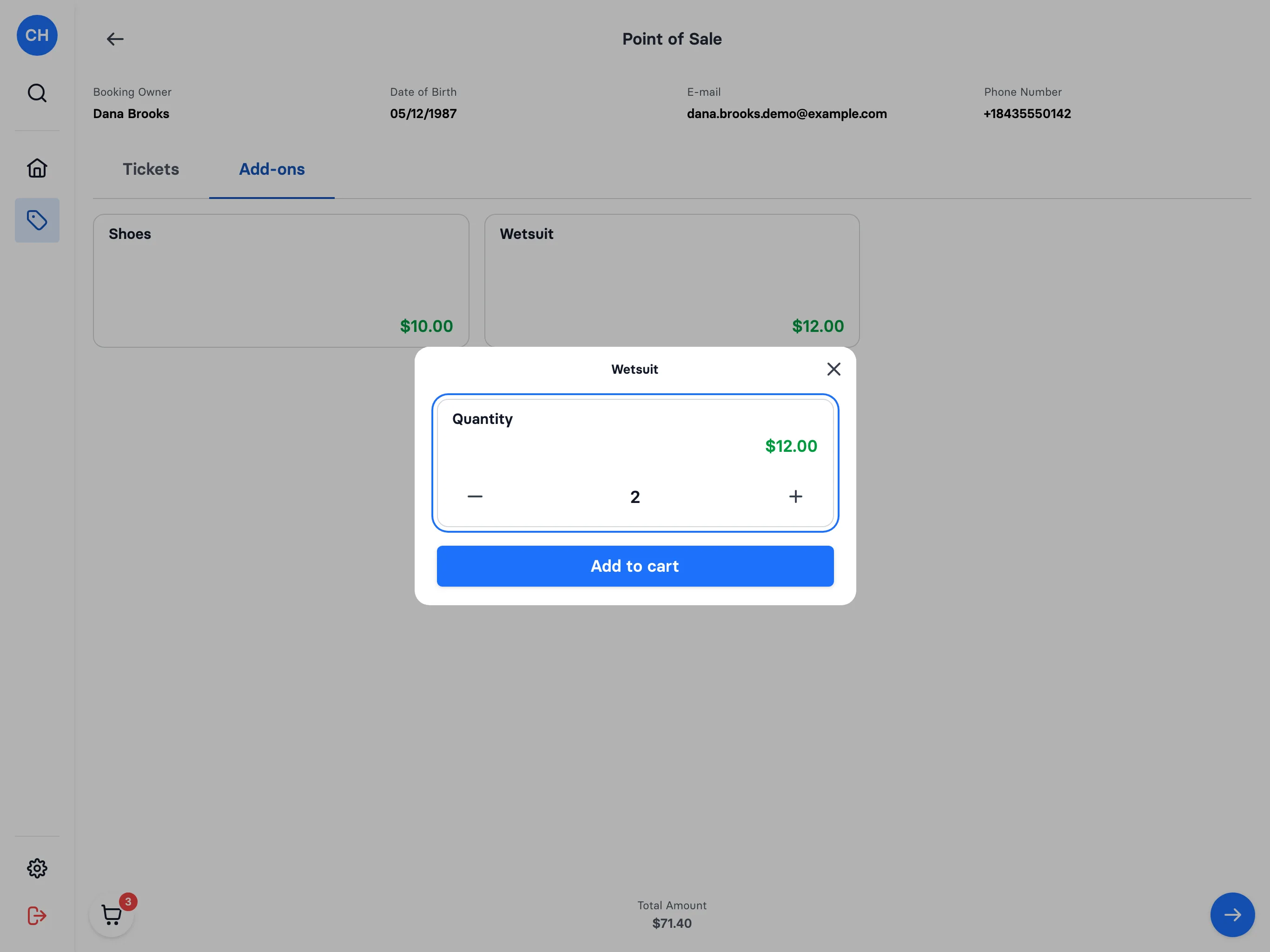
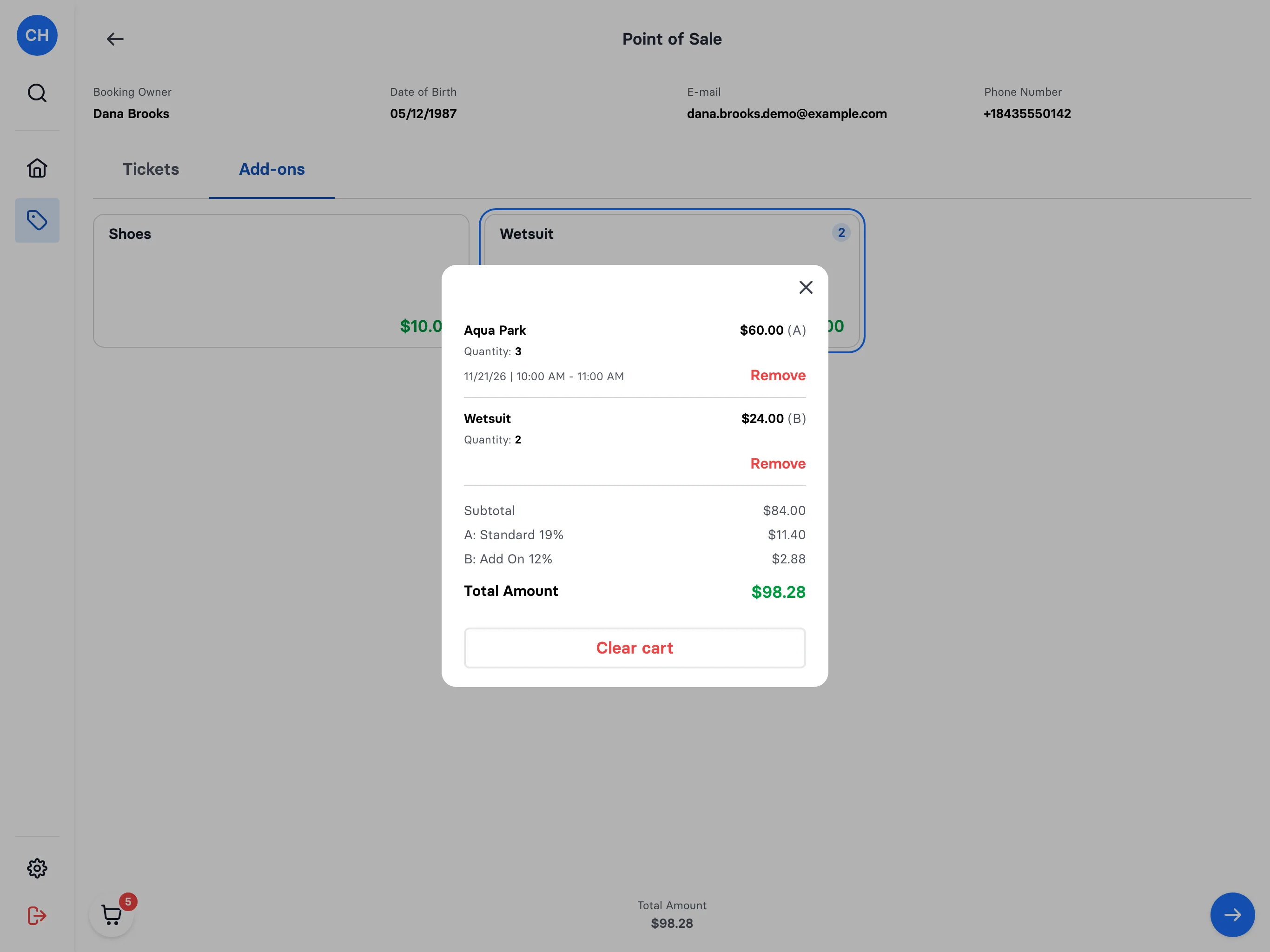
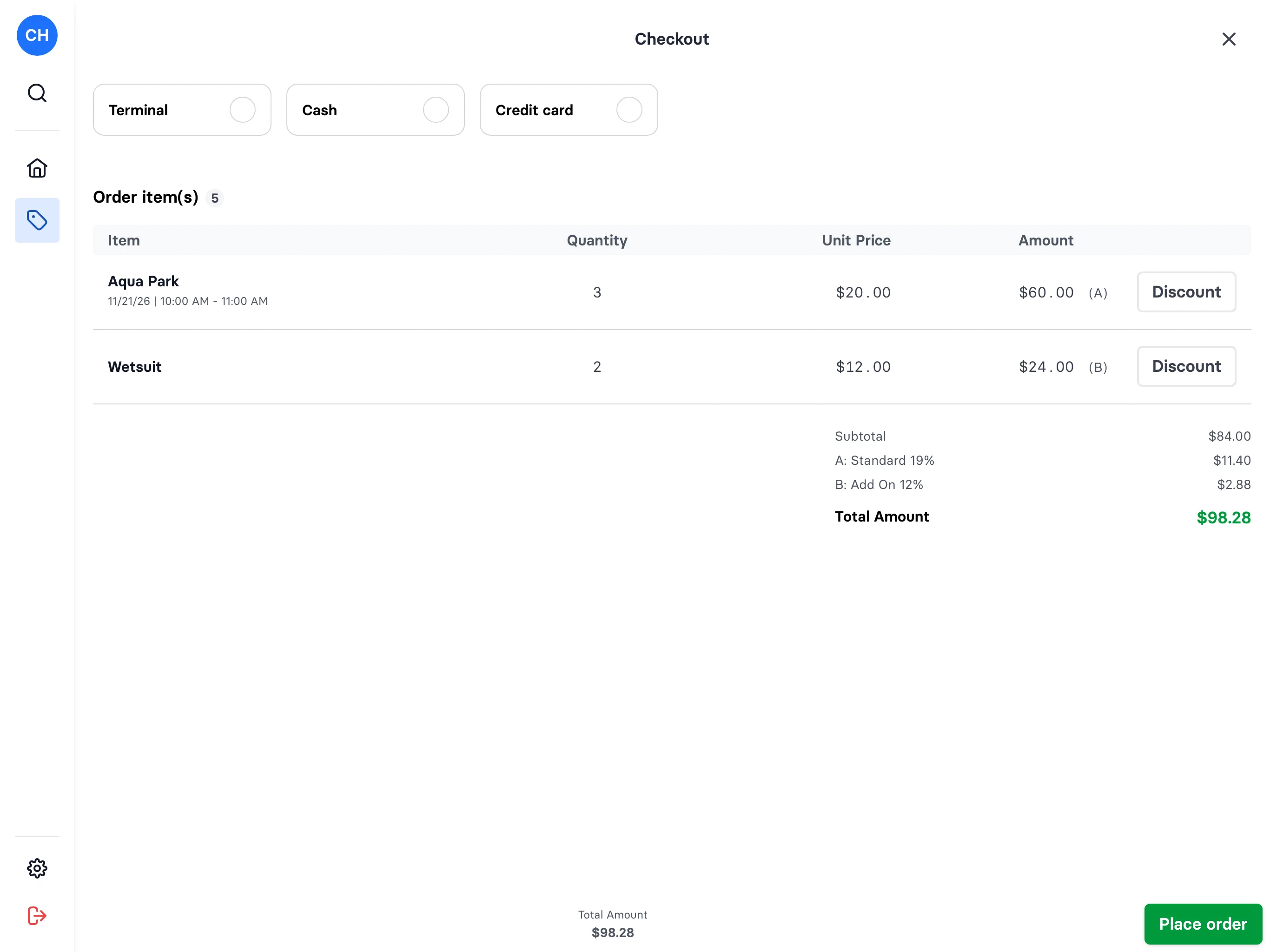
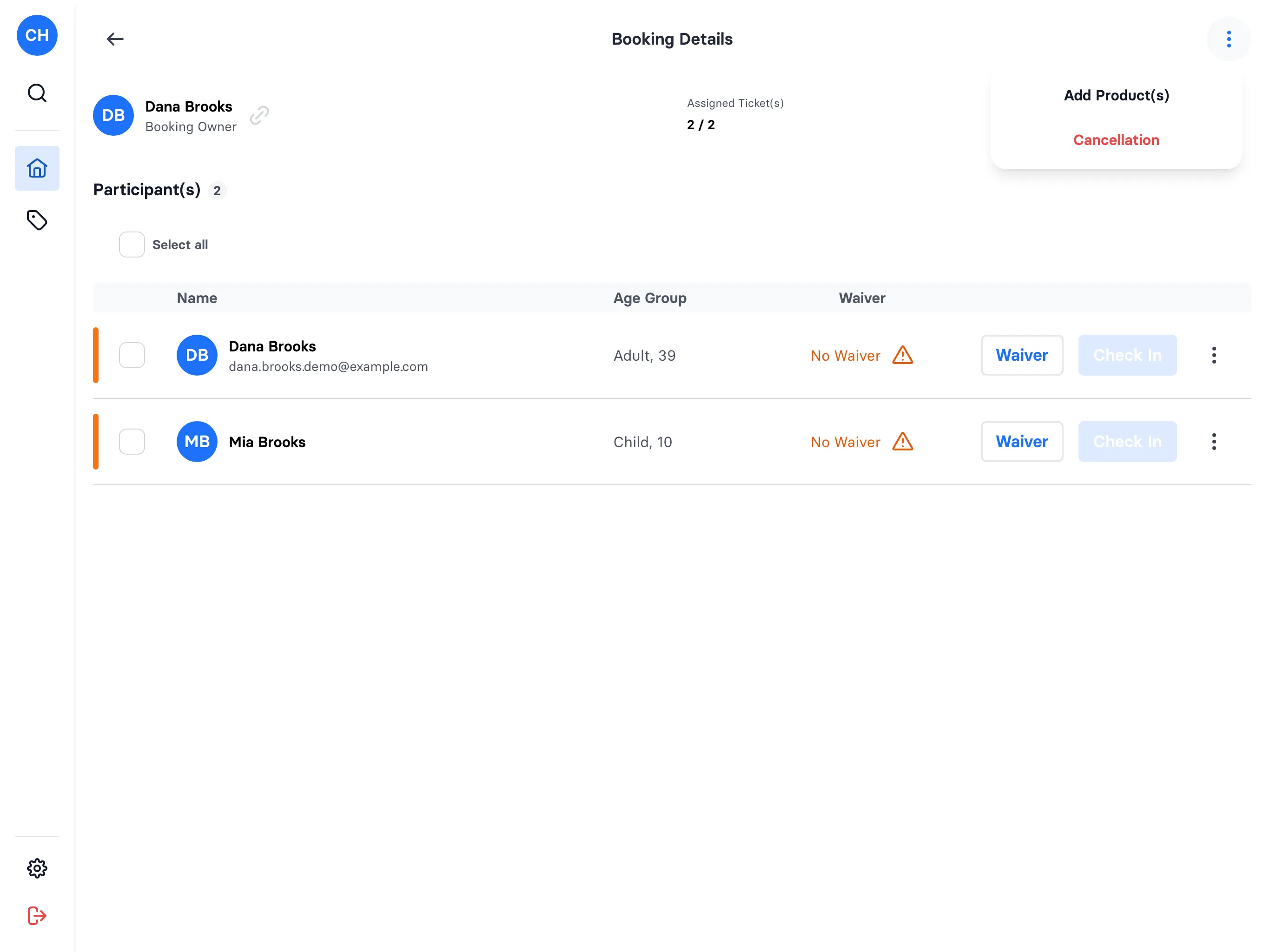
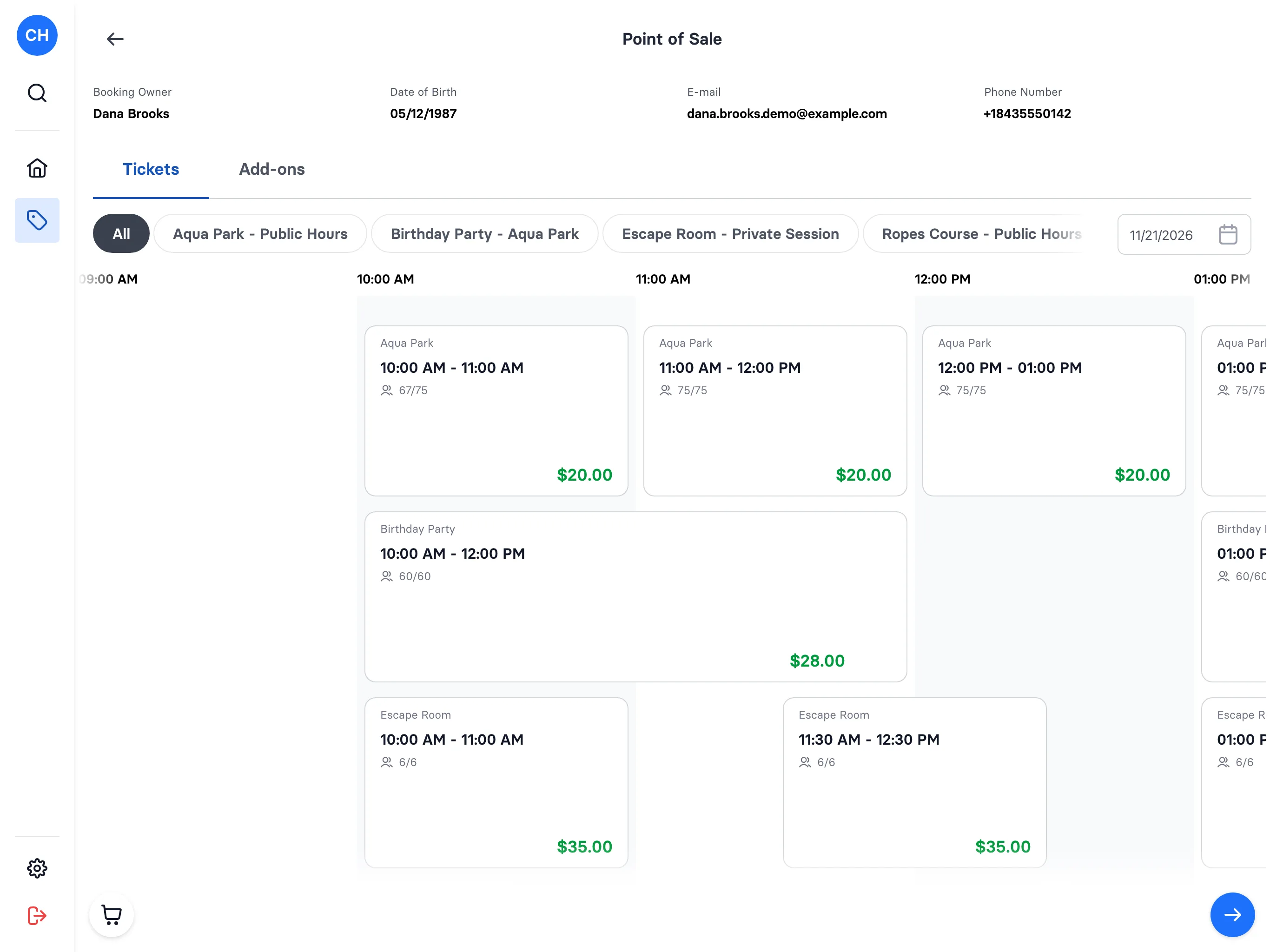
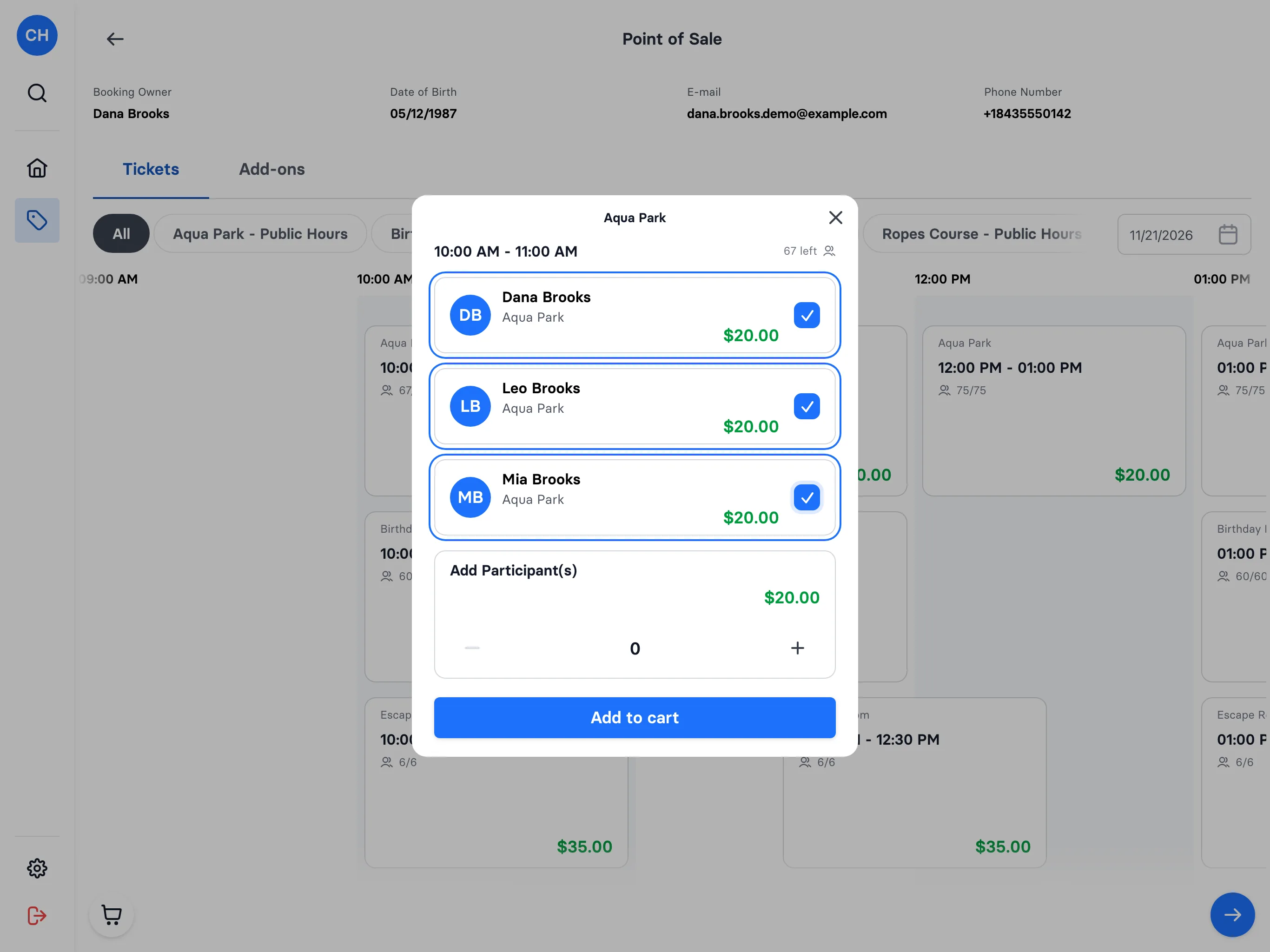
Selling at the till now works with a cart. Pick the booking owner and the Tickets tab shows every time slot of the day on one timeline, each card with its seats left and its price. Tap a slot, tick the guest and their family by name or add tickets without a name, and they go straight into the cart. Named tickets are assigned on the spot. Add-ons work the same way on their own tab. The bar at the bottom keeps the count and the total: open it to remove a line or clear the cart, then go to checkout. Adding products to an existing booking opens the same screen on the booked day.

A new sale at the till, with a cart and named tickets - step 1A new sale at the till, with a cart and named tickets - step 2A new sale at the till, with a cart and named tickets - step 3A new sale at the till, with a cart and named tickets - step 4A new sale at the till, with a cart and named tickets - step 5A new sale at the till, with a cart and named tickets - step 6A new sale at the till, with a cart and named tickets - step 7
FixedPoint of sale

Short time slots fit inside their cards on the till timeline

When a day has time slots shorter than 30 minutes, the ticket timeline at the till now gets wider so every card has room for its content. Before, the text of short slots could spill out of their cards and was hard to read.

FixedPoint of sale

Panels opened from the till cart now sit above the navigation

When you opened a panel from the cart bar on the till, the navigation could show on top of its darkened background. Panels now always open above the rest of the screen, so the one you opened is the only thing in front.

ImprovedPoint of sale

Continue on an empty till cart now tells you why nothing happens

On the till, the continue button used to be greyed out while the cart was empty, with no explanation. You can now tap it, and a message tells you the cart is empty and that you need to add tickets first. Staff on a busy shift can see straight away what is missing.

Continue on an empty till cart now tells you why nothing happens
ImprovedBooking

Guests see the membership price before adding it to the cart

When a guest chooses how many memberships to buy, the sheet now shows the price for that number right away, before it goes into the cart. If a quantity discount applies, the regular price is shown crossed out next to it. Guests can see what they will pay without opening the cart first.

NewPricing

Quantity prices now work for memberships

When a guest puts several of the same membership or season pass in the cart, a quantity price rule now applies to them, the same way it already does for tickets. This lets you offer a family price, for example a lower price for each pass from the third one on. The cart works out the price again each time a pass is added or removed.

FixedPoint of sale

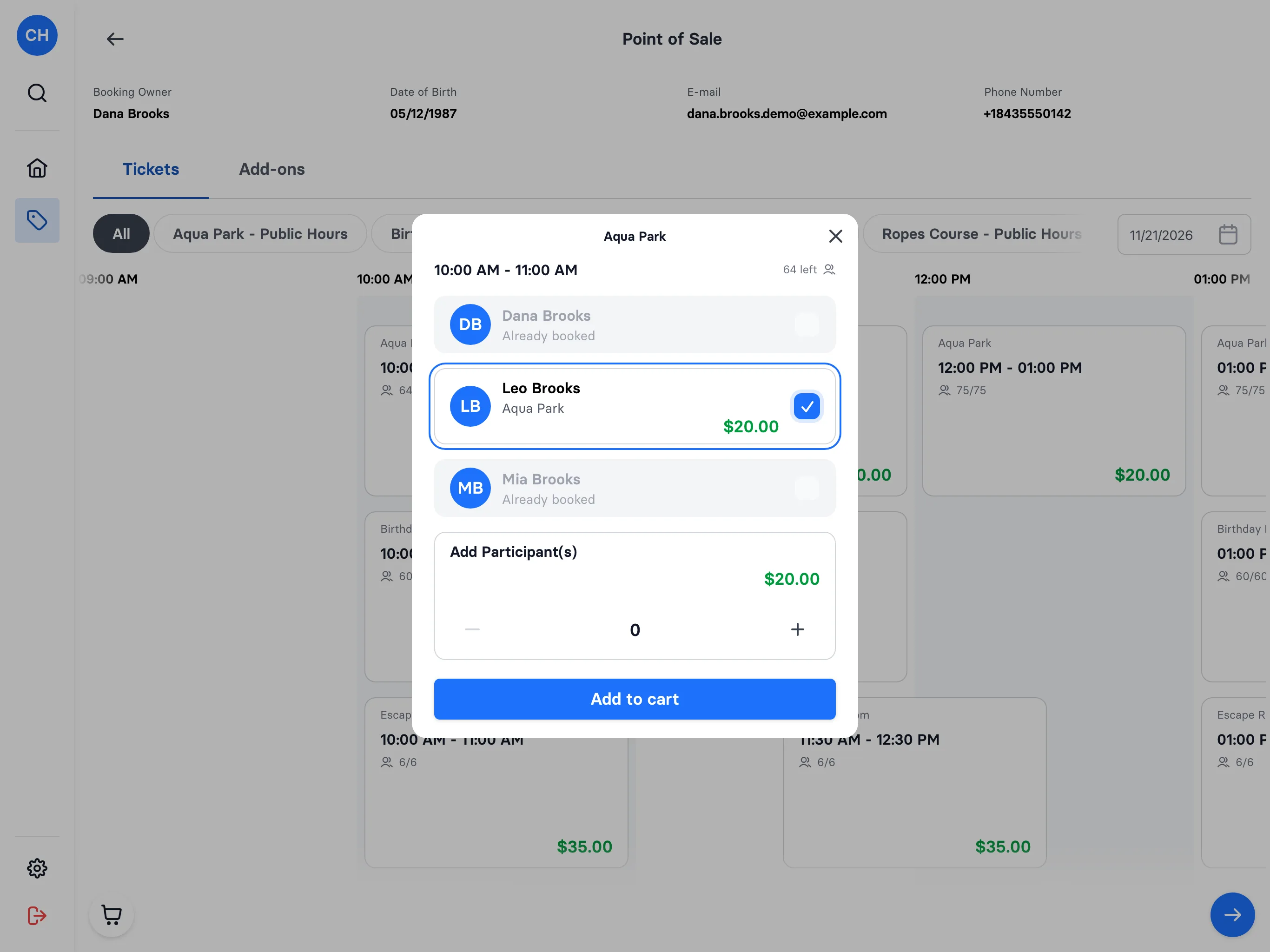
The till no longer books a participant twice into one time slot

When you add participants to a time slot at the till, anyone already booked into that slot is now marked as already booked. This stops a guest from ending up in the same slot twice by mistake.

The till no longer books a participant twice into one time slot - step 1The till no longer books a participant twice into one time slot - step 2
NewBooking

Limit how many seats one offer can take on a shared resource

When several offers share one resource, each offer can now have its own seat limit on it. Once that offer's bookings reach the limit, its timeslot shows as full, even if the resource still has room for the other offers. This keeps one offer from taking all of a shared resource's capacity.

NewBooking

Offers that share a resource no longer oversell it

When several offers use the same resource with a capacity, such as one trampoline hall, a time slot now only sells the places that resource has left. This applies to online booking and to the till, so two offers can no longer fill the same hall twice. A slot shows as sold out as soon as the lower of the two limits is reached.

NewWaivers

Guests get a copy of their signed waiver by email

After someone signs a waiver, they now get an email with their copy. It shows who signed, who it was signed for and when, and links to the waiver. When a parent signs for a child, the email names the child, and it tells the signer how to reach you if a detail is wrong or someone signed without permission.

NewPoint of sale

See at a glance whether a guest's waiver is still valid

A guest's waiver list on the POS now has a Status column in place of the old Revoked On date. Each waiver shows Valid, Expired, Outdated (signed on an older version of your waiver) or Revoked. Staff can tell at the counter whether a guest needs to sign again, without opening the PDF.

FixedBooking

Add-on quantities now stop at 500

When booking online, guests can choose an add-on quantity of up to 500, in whole numbers only. A higher amount or a partial number is no longer accepted and the cart stays as it was. This keeps a mistyped quantity out of the order.

NewBooking

Season passes can run between two fixed dates

A season pass can now run for a fixed period instead of a set number of days from the day it is added to the cart. On the booking page, guests see the pass's start and end dates, without the line for how many days it is valid. This is useful for a pass that should end on the same date for everyone, whenever they buy it.

FixedBooking

Focus returns to the button that opened a dialog

When you close a dialog, sheet or overlay, the keyboard focus now goes back to the button that opened it. If you work with a keyboard or screen reader, you can carry on from where you were instead of finding your place on the page again.

FixedKiosk

Legal age now checked on every adult sign-up

Sign-ups with a password and adult family member sign-ups now refuse a date of birth under your park's legal age and explain what to do next. If the e-mail or phone matches an existing underage account, the kiosk, checkout and sign-up forms show: "These contact details can't be used here. Please contact the park." Staff may get asked about this message at the counter.

NewBooking

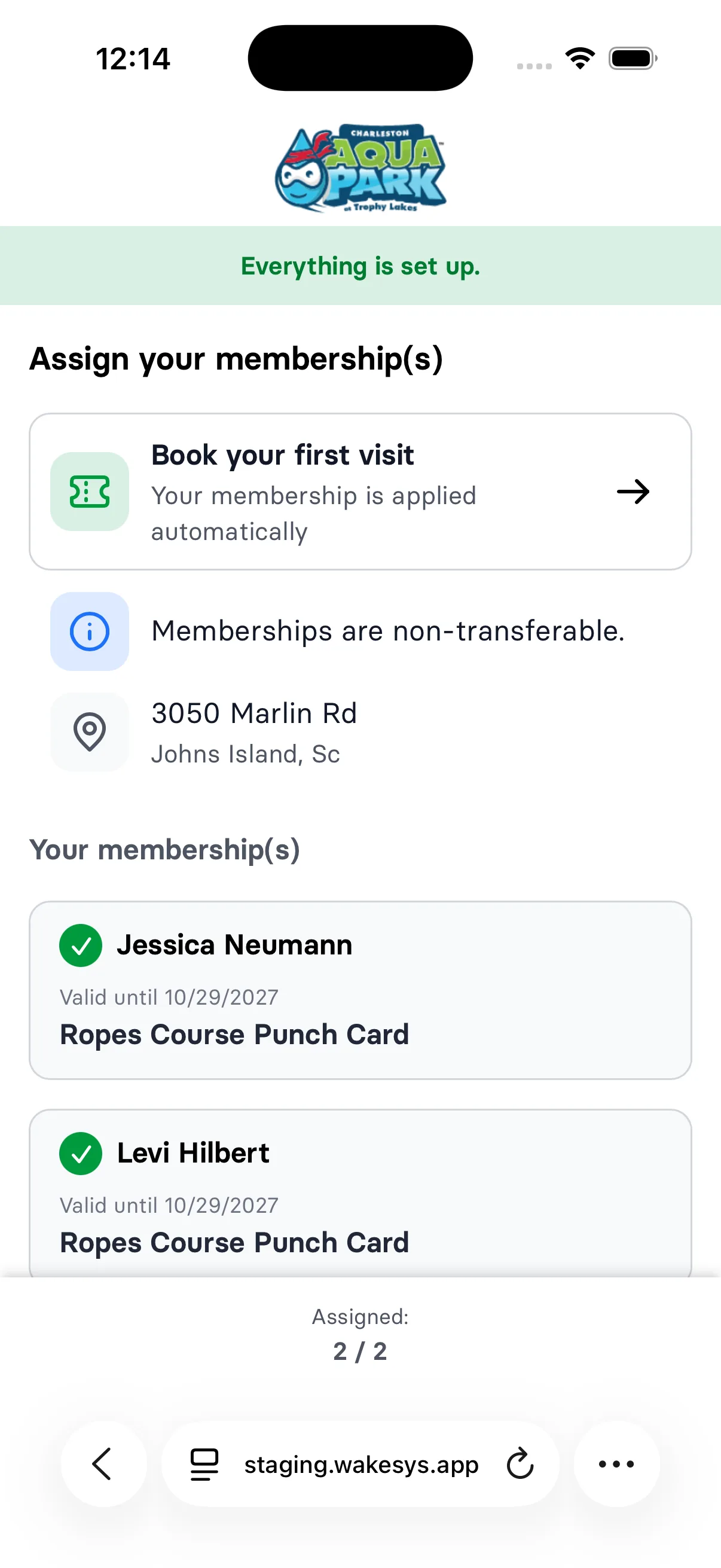
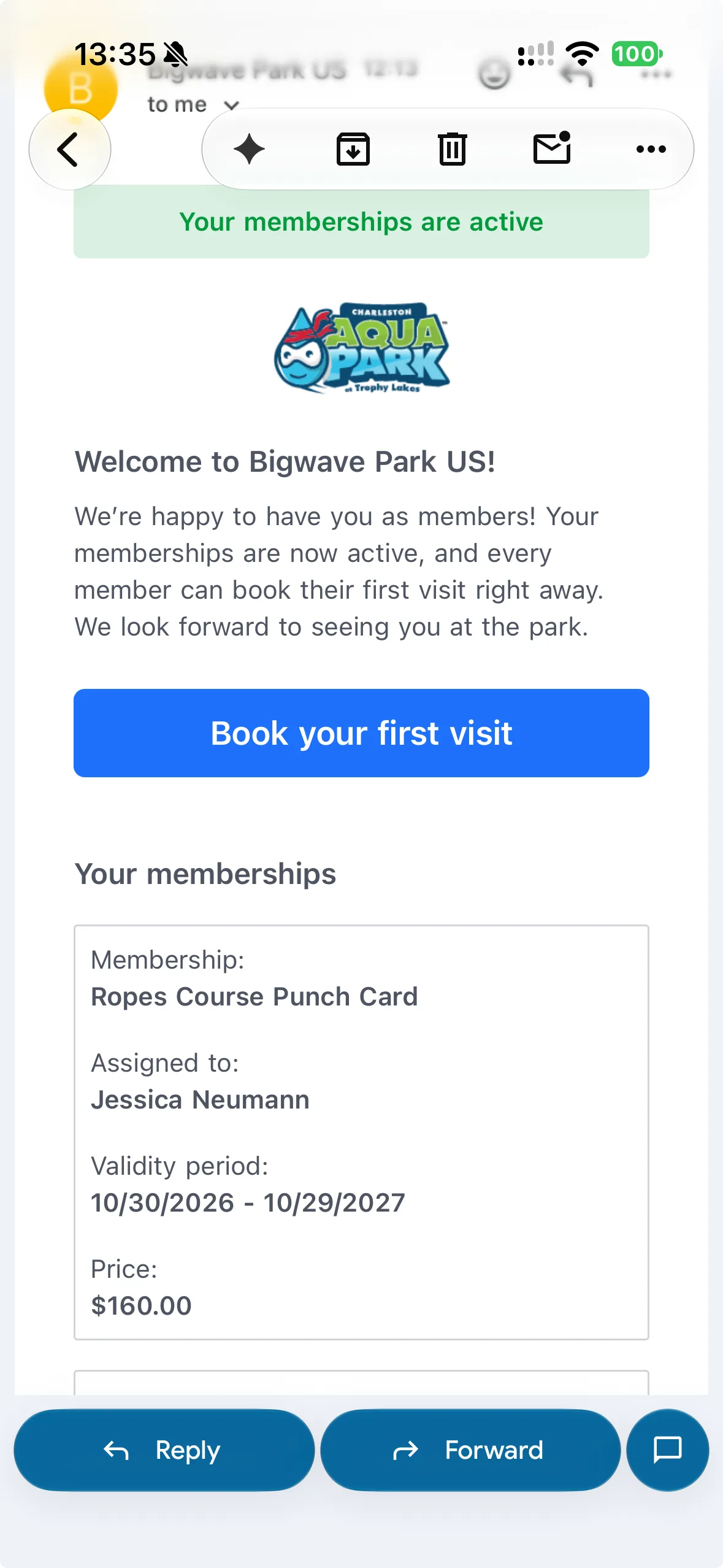
Guests can book their first visit right after buying a membership

When every membership in an order was already assigned during checkout, the confirmation page now shows a "Book your first visit" button that leads straight to the booking pages. The message and button about assigning memberships no longer appear in that case, since there is nothing left to assign. If at least one membership is still unassigned, guests see the assignment step as before.

ImprovedBooking

No assignment button in the e-mail once all memberships are assigned

When every membership in an order is already assigned, the order confirmation e-mail no longer shows a button for assigning them. It now says that there is nothing left to do, that a welcome e-mail with the membership details is on its way, and that the receipt is below. This way your guests know they do not need to do anything else.

October 2026

27 changes

NewBooking

Memberships assigned before checkout are created at payment

When a guest buys a membership online and assigns it to a person before checkout, the membership is now created for that person as soon as the payment goes through. Each pass ends up with the right person straight after the purchase, for example when someone buys passes for the whole family.

Memberships assigned before checkout are created at payment
NewBooking

Guests can choose who a membership is for when they buy it online

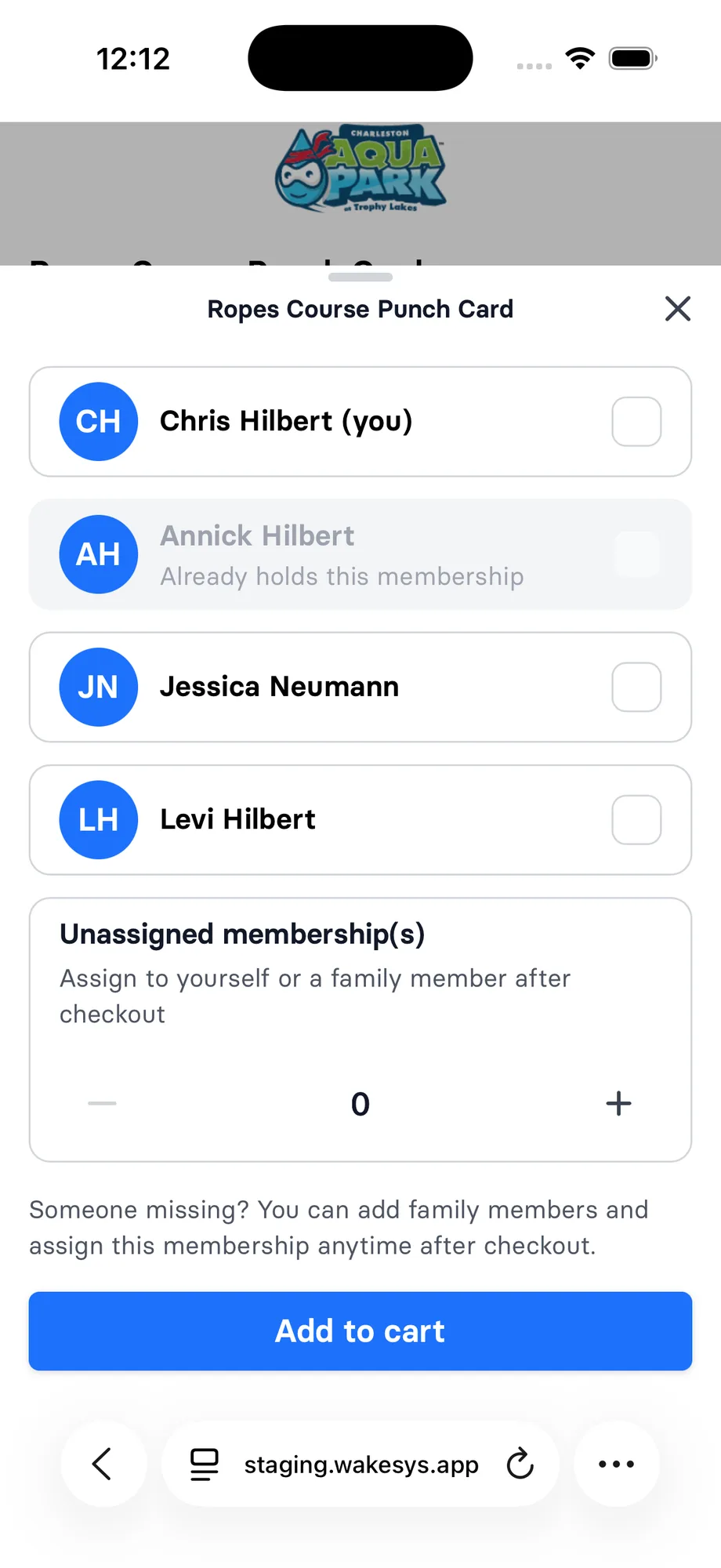
When a logged-in guest adds a membership in online booking, they can now tick themselves and their family members to say who each membership is for. Anyone who already holds that membership is marked and cannot be picked again. Guests can still add memberships for people who are not on the list and assign them after checkout.

Guests can choose who a membership is for when they buy it online
ImprovedBooking

The booking e-mail step now mentions membership benefits

When guests enter their e-mail address during booking, the list of reasons to do so now includes claiming their membership benefits. Guests with a membership can see right away that their e-mail address is how they get their benefits.

NewBooking

One membership perk can now cover several offers

A membership perk can now apply to more than one offer, and all of those offers share one usage limit. If a membership allows one booking per day, a booking on any of those offers uses up that allowance. You can put several offers under one perk without members getting a separate allowance for each offer.

ImprovedBooking

Buying a membership online now starts with the e-mail step

Guests who pick a membership on the booking page now enter their e-mail address first, the same way they do when booking a ticket. Returning customers confirm their address with a one-time code, and guests who are already logged in skip this step. This links the membership order to the right customer from the start.

Buying a membership online now starts with the e-mail step
ImprovedBooking

Booking panels now show the name of what the guest is booking

When a guest picks a time slot, an add-on or a membership, the panel that opens now shows the name of that offer, add-on or membership at the top. Before, it showed a generic heading. Guests can see at a glance what they are adding to the cart, and a membership that is already in the cart now has an Update cart button.

ImprovedBooking

Unassigned tickets and memberships are now listed first

When guests assign the tickets and memberships from a booking to people, the ones that still need a name now appear at the top of the list. The ones already assigned follow below, sorted by name. This makes it quicker to see who is still missing.

FixedBooking

Locked tickets no longer highlight when you hover over them

Guests assign their tickets to people on the ticket claim page. A ticket that is already checked in or paid for with a membership can't be taken off the person it is assigned to. Its card now stays plain when the mouse moves over it, so it no longer looks like something guests can click.

NewBooking

Memberships are live

You can sell memberships on your online booking page. Guests buy one, choose who it is for, and the holder signs the waiver. Members book like everyone else. Same booking page, same time slots. The only extra step is signing in, and only for families with a membership.

Memberships are live
NewBooking

Member tickets stay with the member

A ticket priced by a membership perk sits on the same card as the other tickets for that time slot. It can't be unassigned and handed to someone else: its menu is greyed out, like for tickets that are already checked in or in the past.

NewBooking

Member prices, with a limit per day or per membership

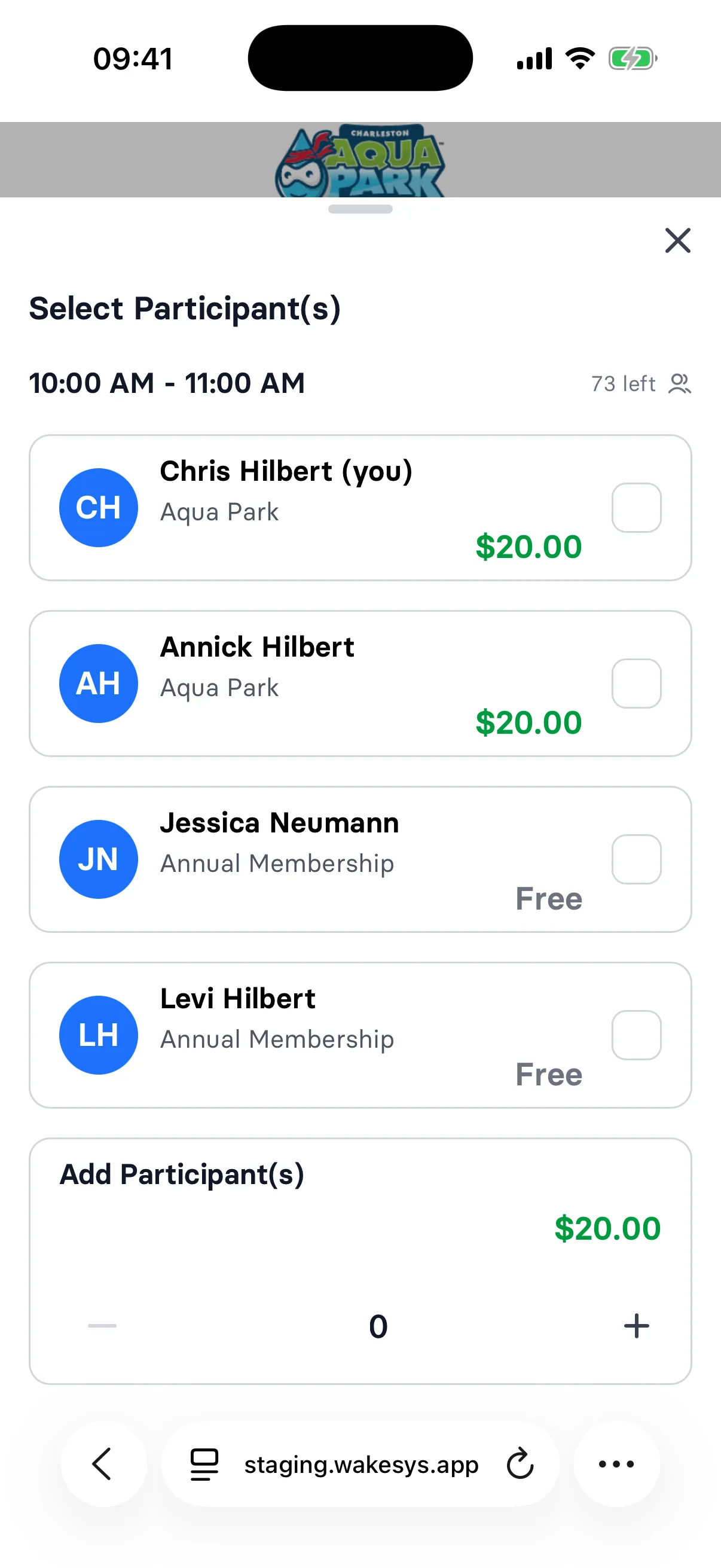
A membership can include a ticket perk, such as a free or cheaper session, with a limit per day or over the whole membership. When a member books online, the time slots and the participant list show the perk price, or Free, next to the membership name, for them and for every family member who holds a membership. Once the limit is used up, the regular price applies again.

Member prices, with a limit per day or per membership
NewBooking

Guests get a welcome email once all their memberships are assigned

Once every membership in an order is assigned to a person, the guest now gets a welcome email from your park. It lists each membership with who it is assigned to, its validity period and its price. It also has a link to book the first visit straight away.

Guests get a welcome email once all their memberships are assigned
NewBooking

Guests choose who each membership is for

After buying, the guest opens an overview of their memberships from the confirmation page and picks who holds each one: themselves, their spouse or partner, or their child. The holder then signs the waiver. Someone who already holds that membership can't be picked again, so one person can buy memberships for the whole family. The overview shows each membership's end date and who holds it, and the link works for 30 days.

NewBooking

A confirmation email for memberships

Guests who buy memberships online get a confirmation email about their memberships, with a button to assign each one to themselves or a family member, the order details and a link to the receipt.

NewBooking

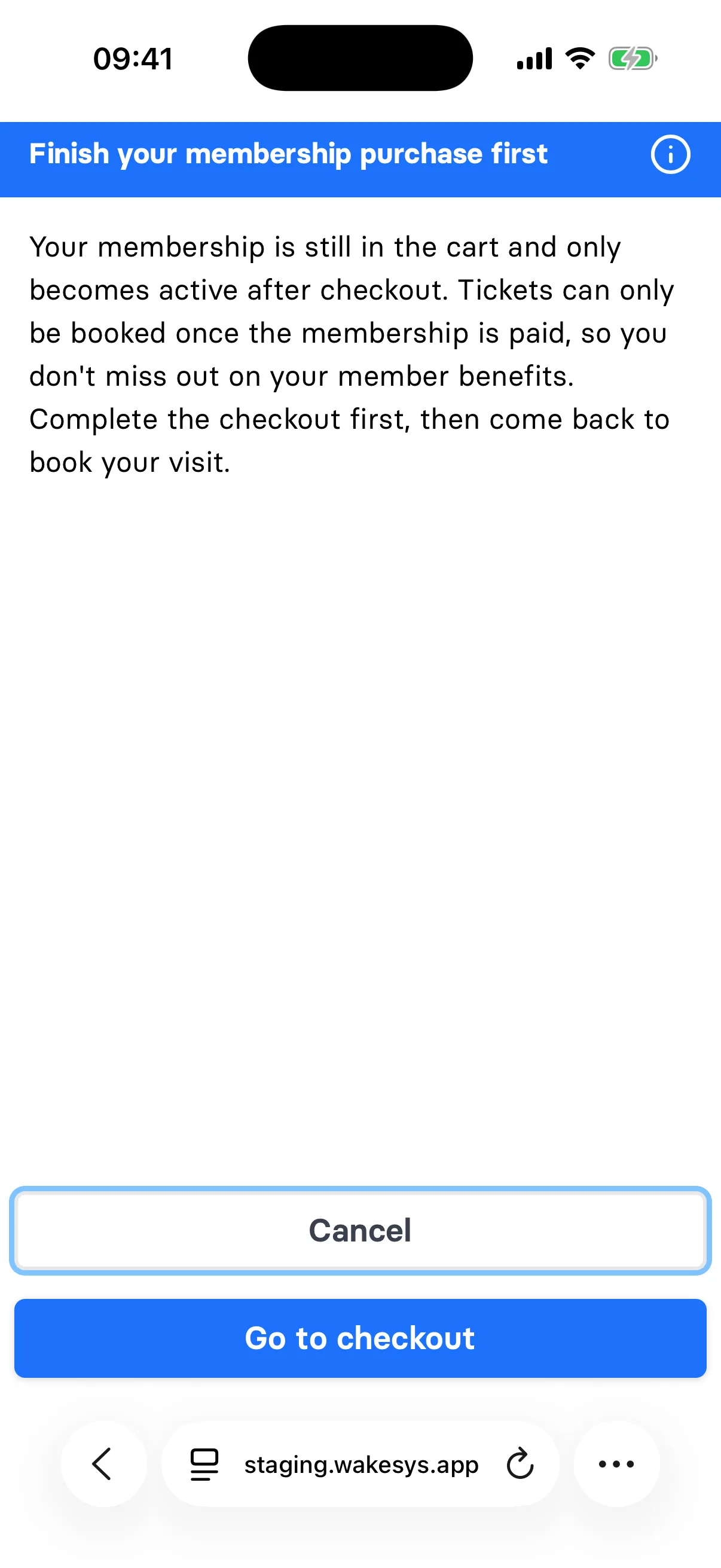
Membership first, then tickets

A membership is paid for on its own, without tickets or other items in the cart. If a guest has a membership in the cart and taps an activity, a message asks them to finish the membership checkout first and links straight to it. A membership becomes active once it is paid, so the member price already applies to the tickets they book next.

Membership first, then tickets
NewBooking

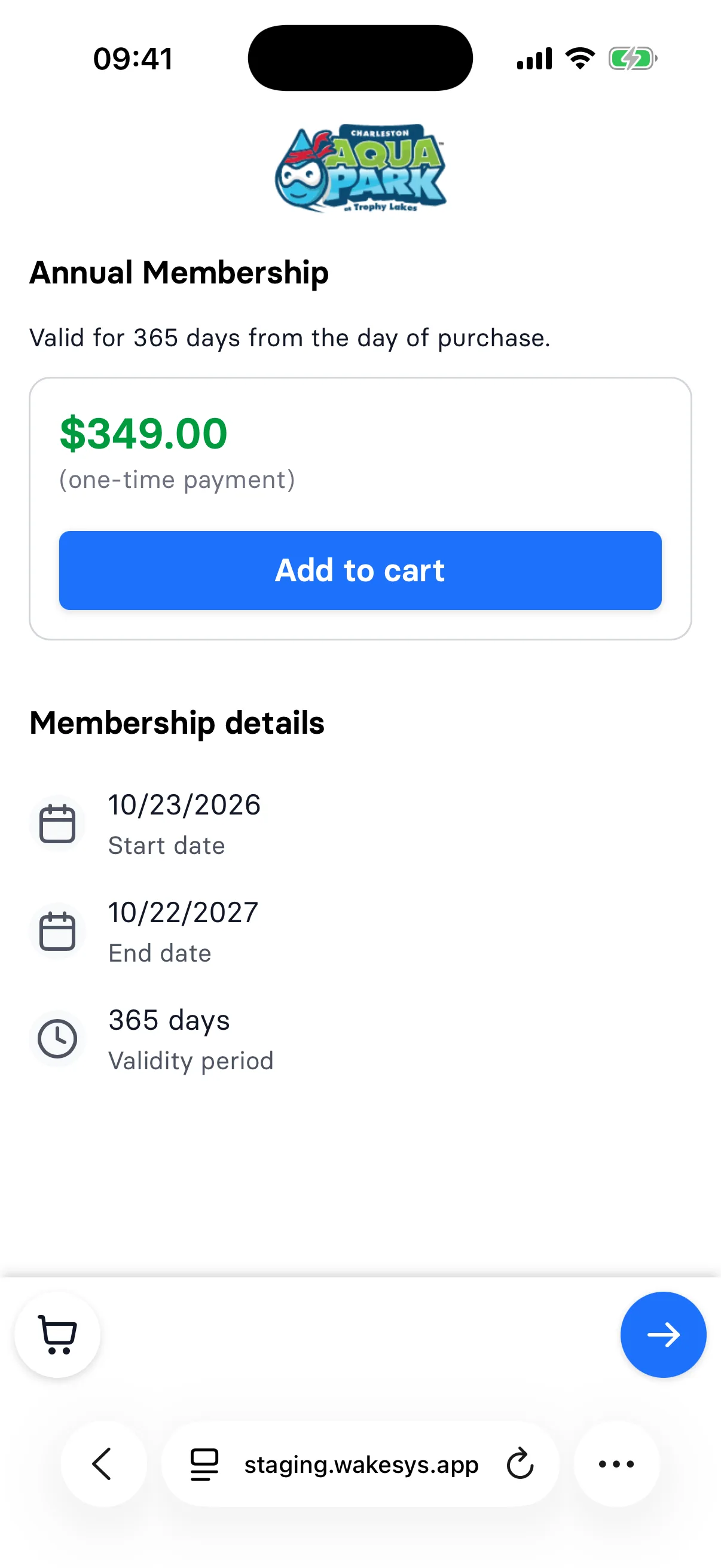
A page for each membership, with its dates

Each membership has its own page with the price, the start date, the end date and how long it lasts, with the day of purchase counted as the first day. A 365-day membership bought on 23 October 2026 runs until 22 October 2027, the same date the cart shows. Guests pick how many they want, assign them after checkout, and read and accept the membership agreement before they pay.

A page for each membership, with its dates
NewBooking

Sell memberships on your booking start page

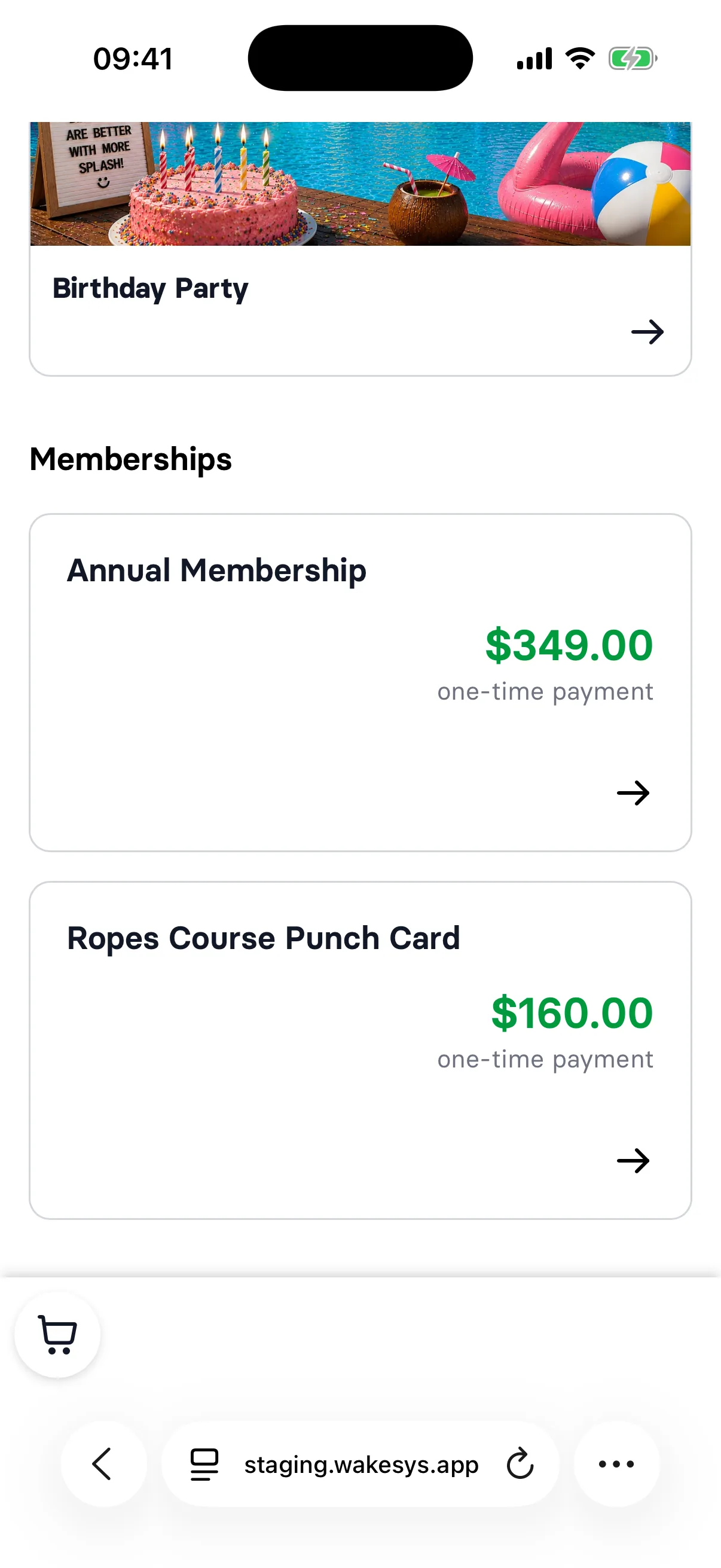
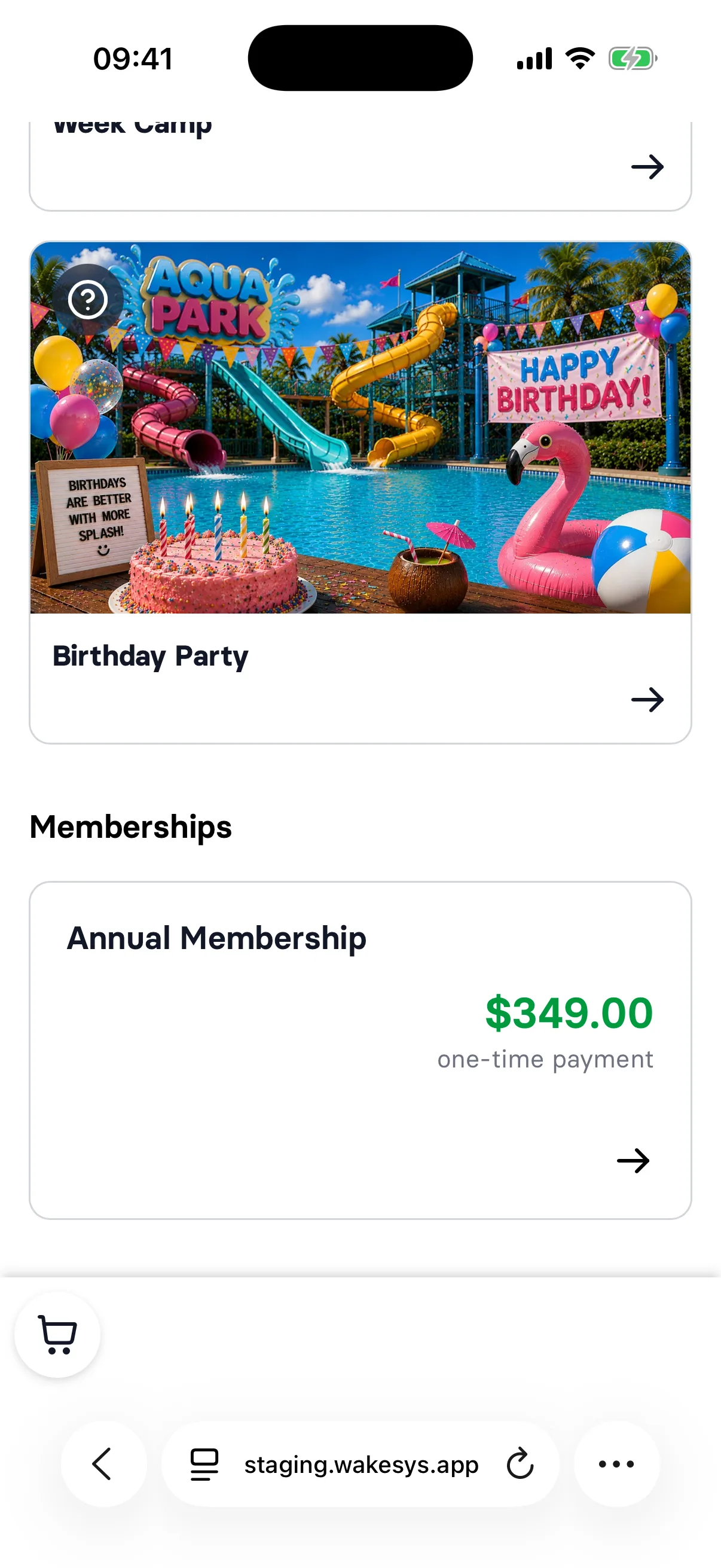
Memberships you sell online have their own section on the booking start page, below your activities. Each one shows its name and price, marked as a one-time payment, and opens its own page. Guests find a membership without needing a direct link.

Sell memberships on your booking start page
FixedBooking

Assigned tickets now show first on the ticket assignment page

On the page where guests assign the tickets of a booking to people, each time slot now lists the tickets that already have a name first, in alphabetical order. The tickets nobody has taken yet come after them. This shows at a glance who is already set and which tickets are still open.

FixedBooking

Bookings made at the same moment no longer fail

When several guests or cashiers booked tickets or paid at the same moment, the booking or the receipt could stop with an error. The system now waits a moment and tries again by itself. This helps most on busy days, both online and at the till.

ImprovedBooking

Easier-to-read cart items in online booking

In the cart and on the payment page of online booking, each item's price now sits on the same line as its name, with the quantity and booking details below. The button to remove an item now sits next to the details and is easier to tap on a phone. Guests can see what they are paying for before they pay.

FixedBooking

Minimum group size now applies when guests pick saved participants

If an offer has a minimum number of participants, guests booking online can no longer get below it by picking saved participants. Time slots that don't have enough seats left to reach the minimum are now marked as not having enough seats, and guests can't pick them for a new booking. Guests also see how many participants the time slot needs.

FixedBooking

Logged-in customers skip the e-mail step when booking

When a customer who is logged in to your park starts an online booking, they now go straight to choosing a time slot. We no longer ask them for their e-mail address again, because the booking is already linked to their account.

FixedBooking

Clear message when a booking code is incomplete

If a guest submits the booking verification code with digits missing, they now see a message asking for the full code, including how many digits it has. The message appears in the guest's own language. This makes it clearer what to fix before trying again.

FixedBooking

The whole "no, thanks" bar on the upgrade step is now tappable

On the upgrade offer step of online booking, guests can now tap anywhere on the bottom bar to skip the upsell and continue to checkout. Before, only the text itself responded, so taps on the bar around it did nothing.

FixedBooking

Offer name shown in the time slot dialog

When a guest picks a time slot while booking, the dialog now shows the name of the offer they are booking. This makes it clear which offer the selected time belongs to.

NewBooking

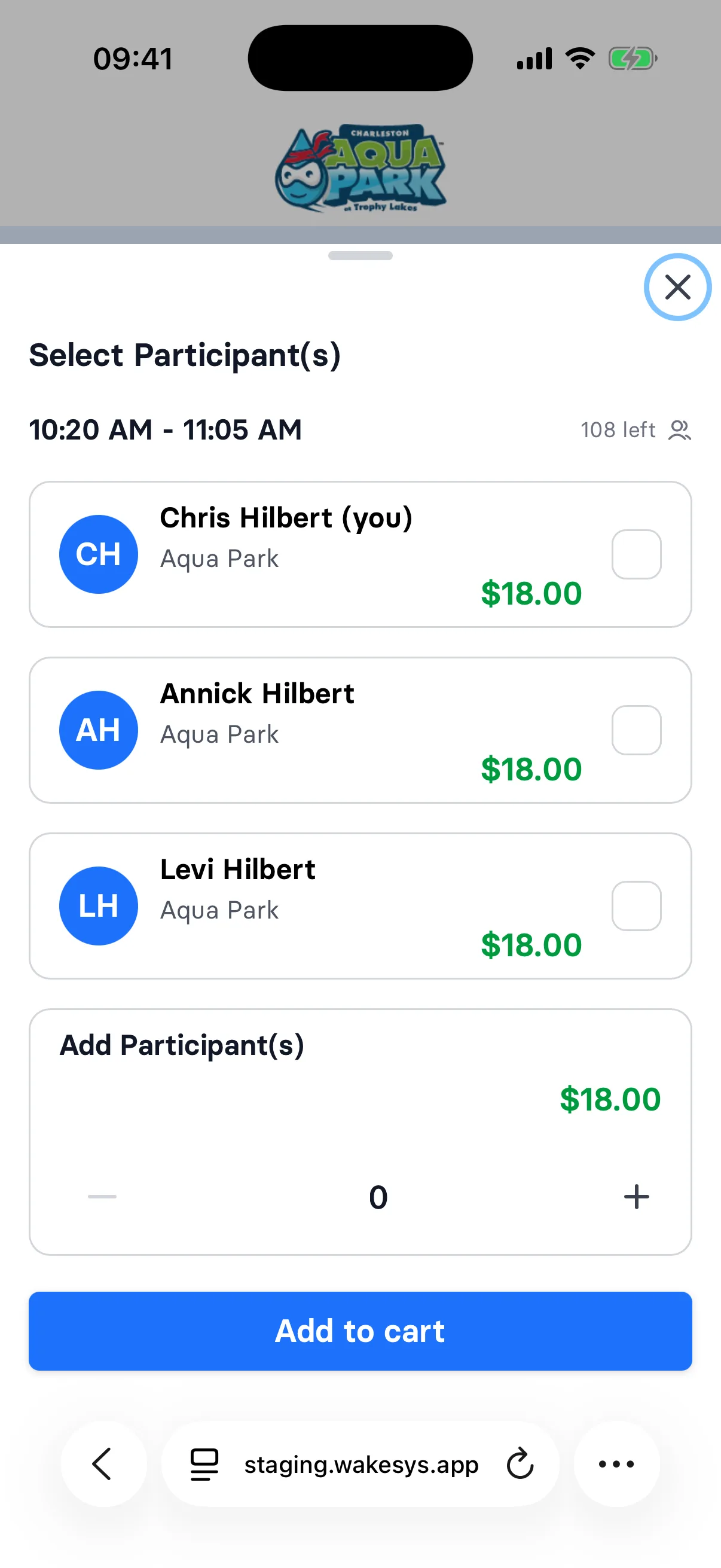
Book the whole family in one go, tickets already assigned

Once a returning guest is signed in, the time slot lists them and every family member on their account, and they tick who is coming. Each ticket goes into the cart already assigned to that person, so once the booking is paid everyone is set up and there is nothing left to hand out. Tickets for friends are still added by number and assigned afterwards. This is groundwork for memberships and punch cards, which come next.

Tapping a slot lists the guest and their family

1 / 9 · Tapping a slot lists the guest and their family

NewBooking

Returning guests confirm it is them with a one-time code

When someone enters the e-mail of a guest who has booked at your park before, the next screen asks for a 4-digit code sent to that inbox. The code works for 10 minutes and allows three tries, then the guest asks for a new one. Once it is in, the guest is signed in and books with their own account, family included. Until now, the e-mail alone recognised a returning guest, but their family members only appeared after paying, when the tickets were assigned. New guests, and guests who are already signed in, see no extra step.

The guest picks an activity

1 / 7 · The guest picks an activity

September 2026

11 changes

FixedBooking

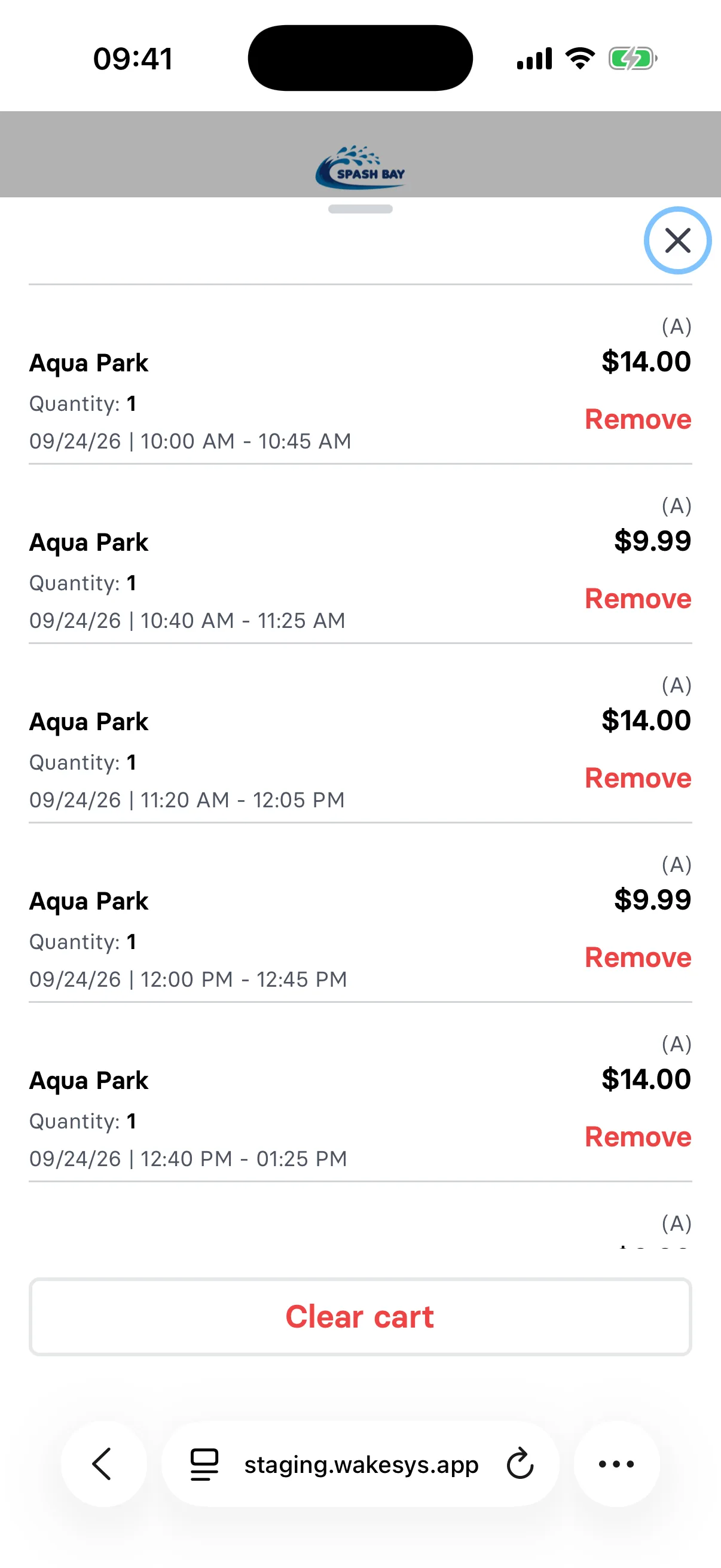
The clear cart button stays in view in long carts

When guests open their cart on the booking pages, the clear cart button now stays pinned at the bottom, however many items the cart holds. Before they confirm, the question now shows the cart total instead of the number of items, and the cart scrolls so the total stays visible.

The clear cart button stays in view in long carts
NewBooking

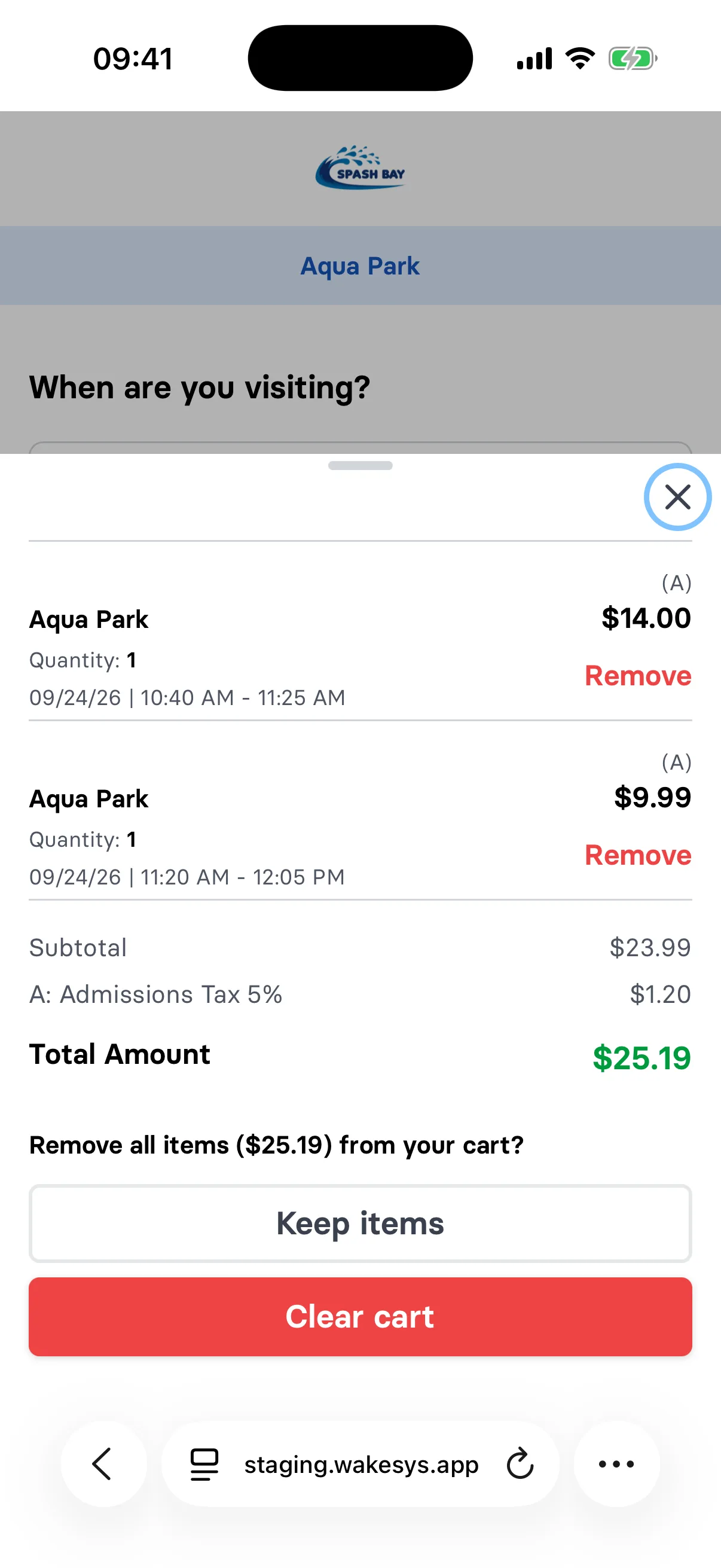
Guests can clear their whole cart in one step

The online booking cart now has a Clear cart button that removes every item at once. Before anything is removed, the cart asks the guest to confirm and shows the total, with a Keep items option to back out. This saves guests from removing items one by one when they want to start over.

Guests can clear their whole cart in one step
NewBooking

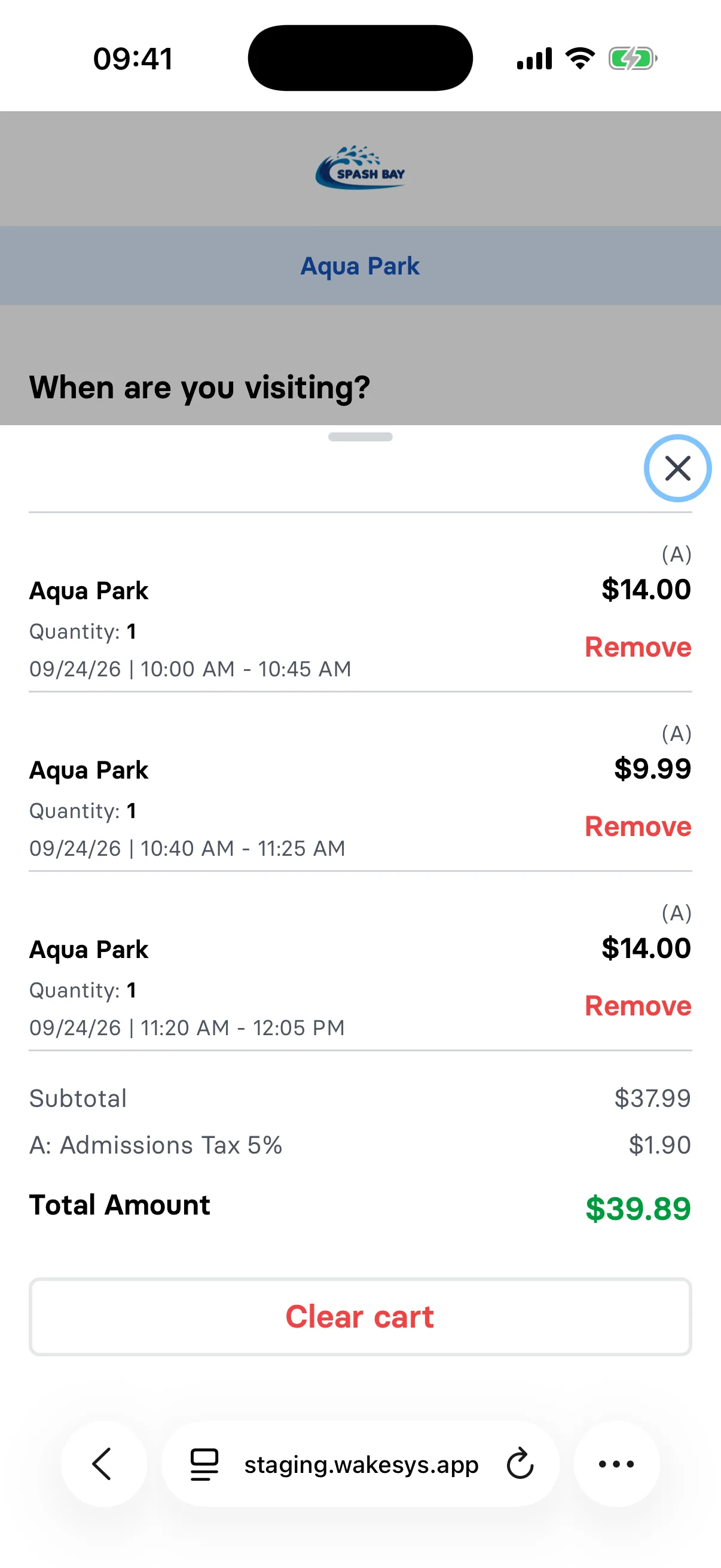
Guests can remove items from their cart when booking online

In online booking, guests can now delete items from the cart, including items booked together as a group. Prices are recalculated for what is left in the cart, so quantity and repeat price rules stay correct. If only add-ons are left, the guest cannot check out and is asked to add a ticket first.

Guests can remove items from their cart when booking online
ImprovedBooking

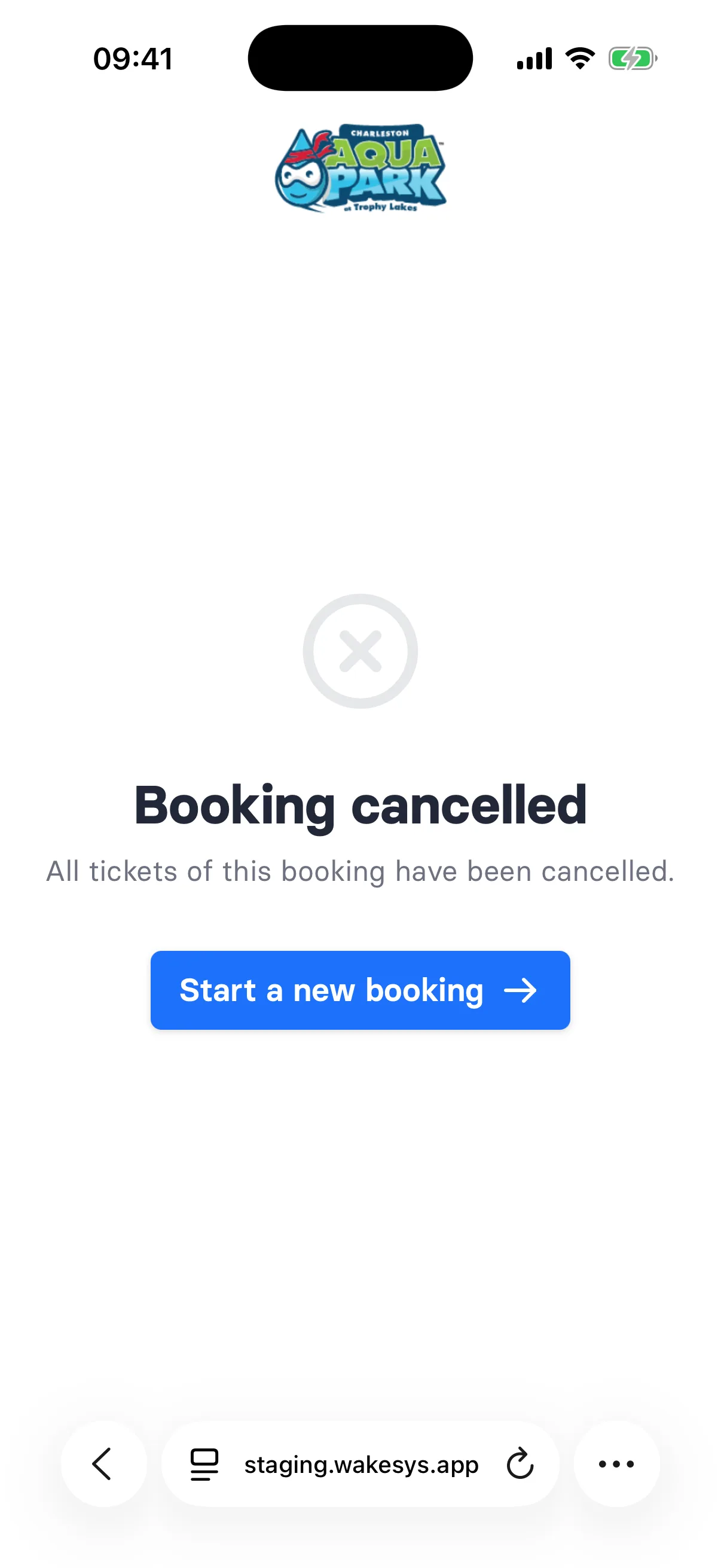
Ticket assignment page shows when a booking was cancelled

If every ticket in a booking has been cancelled, guests who open the link to assign tickets now see a clear "Booking cancelled" message. A button takes them straight to your booking page to start a new booking, so they are not left looking at a page with no tickets.

Ticket assignment page shows when a booking was cancelled
NewIntegrations

Connect Claude or ChatGPT to your park data

wakesys now runs an MCP server, so you can point Claude or ChatGPT at your own park data and ask it questions in plain language. How many tickets went out last August, which sessions sold out, what the weather did to your bookings. Setup is at https://dwh.wakesys.com/connect. Access is in beta, so write to support@wakesys.com and we will switch it on for your park.

ImprovedBooking

The cart is now visible on the first booking page

The booking start page now shows the same cart bar as the later steps, with the items added so far and the total. Guests who go back to pick another offer can see what is already in their cart without moving forward a step. If the cart is empty or the session has expired, the bar simply shows an empty cart.

ImprovedBooking

An empty cart now sends guests back to the booking start page

If a guest reaches the checkout with nothing in their cart, they are now sent back to the booking start page and see a note saying the cart is empty and that items need to be added again. This happens whichever way they reached the checkout, so nobody gets stuck on a payment page with nothing to pay for.

FixedBooking

Dates of birth in the future are no longer accepted

Every form that asks for a date of birth now shows an error when the date lies in the future. This applies to online checkout, guest and family member signup, the kiosk signup and editing a customer at the till. It stops a typo from creating a customer with an impossible age.

FixedBooking

Tickets can no longer be assigned after a session has ended

Guests can only assign or change the name on a ticket while its session is still ahead. Once the time slot is over, the ticket list marks it as past and the assignment step is blocked. This keeps names from being changed on sessions that already ran, so your check-in and attendance records stay accurate.

ImprovedBooking

Online booking now works when embedded in your website

If your park's website shows the online booking inside an embedded frame, guests can now add tickets to their cart and check out without losing their selection along the way. For this to work, your website address needs to be stored with your park in wakesys. Only that website is allowed to embed the booking pages.

FixedBooking

Resetting a password now signs you out everywhere

When you set a new password through a reset link, all existing logins for that account are signed out on every device and browser. Any other reset links sent to the same account stop working at the same time. If someone else had access to your account, they lose it as soon as you reset your password.

August 2026

19 changes

ImprovedPoint of sale

Home screen shortcuts now carry the cash register name

When you install the till on a tablet or phone home screen, the shortcut is now named after the cash register it opens instead of a generic label. The tablet version shows the register name followed by (Tablet). If you run more than one register, you can tell the icons apart at a glance.

Home screen shortcuts now carry the cash register name
ImprovedBooking

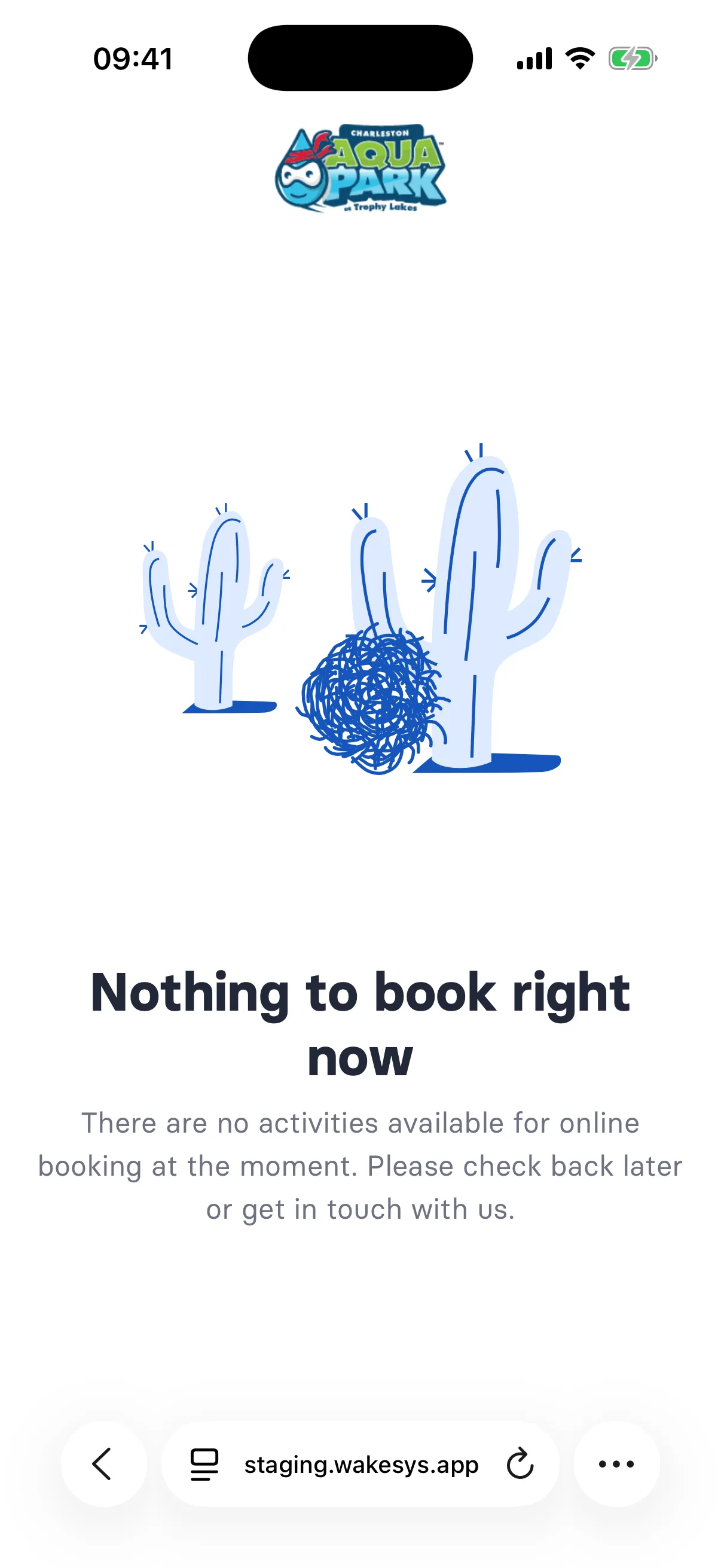
Online booking now explains when nothing is bookable

When your park has no activities available for online booking, the booking start page now shows a short message instead of an empty page. It tells guests there is nothing to book at the moment and invites them to check back later or contact you. This avoids the impression that the page is broken.

Online booking now explains when nothing is bookable
ImprovedWaivers

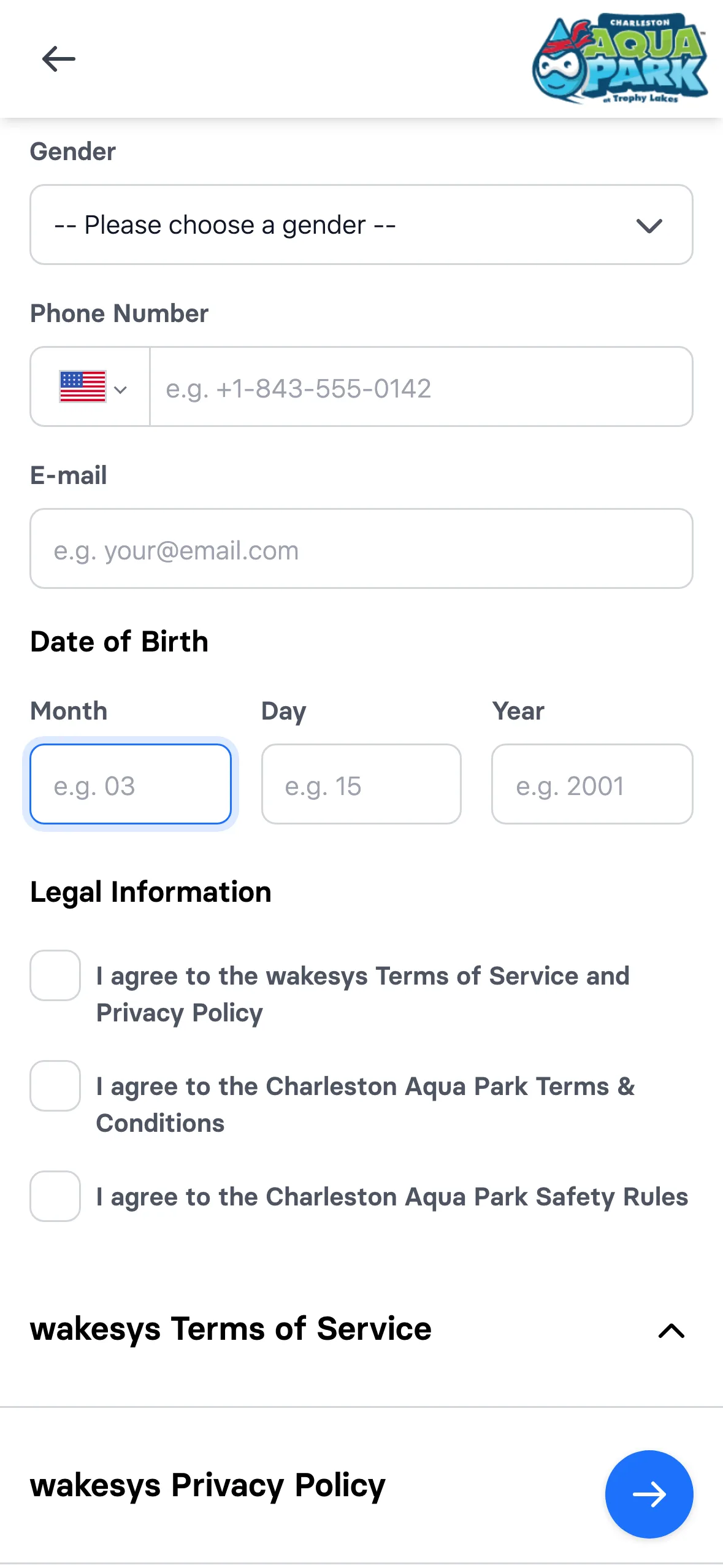
Date of birth fields move on as you type

Typing a date of birth now moves to the next box on its own, and it does not always wait for two digits. Type a 2 into the month and it moves on right away, because no month starts with a 2. Type a 1 and it waits, because you could still mean January, October, November or December. The day works the same way from 4 up. Backspace in an empty box takes you back to the one before it, and the order of the boxes follows the date format your park uses.

Date of birth fields move on as you type
ImprovedWaivers

Waivers now show the time of signing

The electronic signature consent line on the waiver PDF now includes the time the guest signed, not just the date. This gives you a more precise record of when each waiver was accepted.

FixedPoint of sale

A discount can no longer be applied twice to the same item

In the till, the discount button is now greyed out as soon as an item already has a discount, including items that are grouped together. If the discount page is opened anyway, a message says a discount is already applied to that item and you are sent back to the checkout. This stops staff from giving the same item two discounts by mistake.

NewPoint of sale

A cake next to the birthday guest at check-in

When someone arriving today has their birthday today, a cake appears next to their name on the booking. Staff see it while working down the list, which is all it takes to say happy birthday. It follows the park's own clock, so it turns over at local midnight.

NewSettings

Add-ons that only sell in one place

An add-on can be limited to online or to the till. A locker key handed over by staff never shows up in online booking, and a parking pass meant to be pre-ordered never shows up at the counter, so a cheaper online price cannot leak to the till. Everything existing keeps selling in both places, and we set it per add-on on request.

FixedBooking

The pay button waits for the payment form

Pay now used to be live before Stripe had finished loading. The first tap did nothing, and it could throw the guest back to the start of the booking and lose the payment step. It now shows a spinner until the card form is genuinely ready.

FixedPoint of sale

Cash only when the total is under the card minimum

Card networks refuse very small charges, and the till used to break when handed one. Below the minimum for the park's currency, card and terminal grey out, cash stays, and a line explains why. Choose card first and then discount the order and it switches over for you.

NewSettings

Arrival time is set per activity

A safety-briefed session can ask guests to arrive 45 minutes early while a walk-on rental asks for none. Set it to zero and the arrival note disappears. The number reaches the confirmation email and the ticket page.

Arrival time is set per activity
In the admin
Arrival time is set per activity
What the guest sees
NewPoint of sale

A green bar when a group is fully checked in

Each booking on the counter list carries a status bar. It stays amber while any ticket is unassigned or anyone is still to arrive, and turns green once the whole party is in. Staff can read a busy slot without opening a single booking.

A green bar when a group is fully checked in
ImprovedWaivers

Waiver addresses come from the household

A child’s waiver asks for a street address the child has never given. It is now filled in from a family member who already has one on file, and stays editable. Friends are deliberately excluded: a friend is not a household.

NewGroup bookings

Share an invite straight from the phone

The invite sheet now offers a real share button on phones, so the booker sends the link into WhatsApp or Messages instead of copying a URL and hunting for somewhere to paste it. Desktop keeps the copy button.

Share an invite straight from the phone
NewBooking

The booking email is kept and reused

Skipping the forms for a returning guest is not new. What is new is that the address typed at the email step is stored on the order, so a first-time guest reaching checkout finds it already filled in instead of typing it twice, and confirmations reach them without anyone re-entering it.

ImprovedWaivers

Waiver wording built for US e-signature law

The acceptance checkbox now carries the affirmative statement an e-signature regime expects, the explanation is written in plain second person, and every generated PDF gets a consent line naming the signer and the date above the document hash.

NewWaivers

Confirm guardianship before signing for a child

Choosing “not your own child” now stops the flow with a plain-language warning: you must actually hold guardianship, and signing for a minor you cannot represent may invalidate the waiver. It points to the invite link so the real parent can sign instead.

Confirm guardianship before signing for a child
NewSettings

Thailand: Bangkok time and Thai baht

Asia/Bangkok and the Thai baht are now first-class options, so a park there runs on local opening hours and prices in baht end to end, from the booking page through the till to the finance report.

FixedSettings

Login only sends you back to our own pages

A crafted login link could land someone on another site the moment they signed in. Where login returns to is now checked against the park's own address, and anything else falls back to the normal page.

NewBooking

Sell a whole time slot to one group

Switch on exclusive booking and the first booking takes the entire slot, however much capacity is left. Escape rooms, private lessons and parties stop sharing a slot with strangers, and staff cannot oversell it at the counter either.

Sell a whole time slot to one group

July 2026

4 changes

NewBooking

A warning when two activities clash

Picking a slot that overlaps something already in the cart raises an amber notice rather than blocking it, because groups genuinely do split up. Slots from the same activity stay quiet, so buying more tickets never triggers a false alarm.

A warning when two activities clash
NewBooking

A minimum group size per activity

Some rooms do not run with two people. Set a minimum and guests see it on every time slot before they choose, with the participant picker enforcing it. Nobody reaches checkout only to be turned away.

A minimum group size per activity
ImprovedPoint of sale

How full each session is, at a glance

Every session on the counter list shows how many tickets are left against its capacity, turns red and reads "Booked out" when full, and collapses once it is in the past. Each booking shows an assigned-ticket counter so unclaimed tickets are obvious before the group arrives.

How full each session is, at a glance
ImprovedPoint of sale

Counter bookings grouped by session

The check-in list groups by booking and by the real session time, so a party that paid in two transactions is one row, and a 10:30 session is no longer folded into the 10:00 heading.

Counter bookings grouped by session

June 2026

5 changes

NewSettings

Sell into a session that has already started

Per activity, guests can book after the clock has started, which is right for hourly rentals and open sessions and wrong for a guided lesson. The running slot stays in the list, marked as already started.

Sell into a session that has already started
NewPricing

Offer a better session mid-booking

After picking a slot, guests are offered another activity that day at a bundle price, with the normal price struck through and an honest way to decline. The discount carries into the next step rather than vanishing.

Offer a better session mid-booking
ImprovedPricing

Discounts read as a price tag

A discounted price is shown as a tag with the old price struck through beside it. When an upgrade happens to cost the same as the normal ticket, the strike-through is dropped rather than claiming a saving that is not there.

Discounts read as a price tag
NewKiosk

The kiosk clears itself when someone walks away

After a minute idle the on-site kiosk asks "Are you still there?" with a countdown, then wipes whatever was typed and returns to the language picker. The next person in the queue never finds a stranger’s half-filled form, and their name, birthday and phone do not sit on a screen in your lobby.

The kiosk clears itself when someone walks away - step 1The kiosk clears itself when someone walks away - step 2
FixedPoint of sale

Unpaid tickets no longer appear on a booking

A sale abandoned before payment left its participants and tickets sitting on the booking as though they were real, which made a group look fuller than it was. Only paid orders count now.

May 2026

6 changes

ImprovedGroup bookings

Clearer wording when sharing a booking

The step where a guest says who a ticket is for now explains why an invite link helps, and the age hints follow the park’s own legal age instead of a hardcoded number.

NewPoint of sale

Sell extras onto an existing booking

From a booking at the counter, staff add tickets or extras onto that same booking instead of starting a second one. The picker opens on the booking’s own date, so the upsell lands on the right session.

ImprovedBooking

The booking flow works like a cart

Guests now choose how many tickets they want on the card itself and add them deliberately, with the price and remaining seats updating as they tap, instead of a ticket appearing the moment they touch a time slot. Add-ons behave the same way, and every booking passes the add-on step.

ImprovedGroup bookings

The confirmation email carries the invite link

The booking confirmation was rewritten to explain that each adult assigns their own ticket and signs their own waiver, and it now has a second button that opens the invite view directly. That is what gets waivers signed before anyone arrives.

NewPricing

A cheaper rate for booking ahead

A rate that unlocks only when the visit is far enough out. Guests browsing next month see the lower price on the slots straight away, and it stacks with the weekday rate, so a distant quiet day shows both discounts at once.

FixedPoint of sale

Dates of birth stop slipping a day

A date of birth is stored at midnight, so west of UTC it could render a day early. Someone born on the fifth showed as the fourth wherever a birthday appears, including the check-in list.

April 2026

12 changes

NewPoint of sale

Participant ages at the counter

The participant list now shows each person’s calculated age next to their age group, so staff can confirm an age-restricted session from the check-in screen instead of opening every customer record.

NewGroup bookings

Other guests’ surnames stay private

Someone holding only the invite link sees "Jan H." rather than a full name for everyone else on the booking. The person who paid still sees the full list. A booker can forward the link to a wider group without handing over a roster.

Other guests’ surnames stay private
FixedKiosk

A timed-out kiosk signup starts over cleanly

A registration that expired part way through dropped the visitor on an error screen with no way forward. The kiosk now takes them back to the beginning and says what happened.

ImprovedPoint of sale

Staff surnames off printed receipts

Receipts printed the cashier’s full name. They now print a first name and last initial, which is enough for the park to know who rang the sale without handing a customer a staff member’s full name.

NewPoint of sale

Refunds recorded with a real reason

The reason list grew from a handful to nine, adding reschedule, operational issue, overbooking, illness, staff error and safety requirements, so a rained-out session and a staff mistake stop landing in the same bucket.

NewSettings

Your own conversion tracking on the booking flow

A park can have its own Google Tag Manager container injected into the customer booking pages, so your Analytics, Meta and Ads conversions finally fire on real bookings instead of stopping at your website. Ask us to switch it on for your park.

FixedBooking

The date picker follows the park's clock

Bookable days were worked out in the guest's own time zone rather than the park's. Booking from another country, you could see the wrong day open at the turn of a month.

NewPricing

Pricing rules instead of duplicate offers

Quiet weekdays, group sizes and repeat sessions became rules you configure rather than separate offers you maintain. Guests see the old price struck through next to the new one, and the rules stack.

NewPricing

A second session the same day costs less

Once a guest holds a ticket for the day, the other slots for that activity reprice to the repeat rate. Each full-price ticket unlocks exactly one discounted repeat, so a single entry cannot be stretched into an afternoon of cheap sessions.

A second session the same day costs less
ImprovedWaivers

Sign the waiver once, not every visit

A visitor is no longer asked to sign again when a waiver already exists and was signed by them or by someone recorded as their family. An unrelated adult still signs, because a friend is not a household.

NewPricing

A group rate that applies to the whole booking

Set a cheaper per-ticket price above a threshold and a party of ten pays the group rate on every ticket, not only the ones past the tenth. The saving appears as they raise the count, so the discount does its selling before checkout.

FixedSettings

Long receipts and reports no longer cut off

Receipts and finance reports that run past one page now paginate properly, and a table row never splits across the break. A large group booking or a busy month produces a complete document.

March 2026

5 changes

NewBooking

A guided path when a minor tries to book

A date of birth under the park’s legal age no longer produces a red field. The submit is blocked and a dialog explains that an adult must complete the booking and can add the child as a participant afterwards, with the steps laid out.

A guided path when a minor tries to book
NewPoint of sale

Cash sales send a confirmation too

A walk-in paying cash at the counter now gets the same confirmation email as an online booker, with the link to assign tickets. Before this, cash customers left with nothing in their inbox.

FixedGroup bookings

A checked-in ticket cannot be unassigned

Once a guest has been checked in at the counter, their ticket can no longer be handed to somebody else from the claim page. The desk and the booking cannot drift apart mid-session.

NewGroup bookings

One link, everyone claims their own ticket

The booker sends a single link to the whole group and each person assigns their own ticket and signs their own waiver. Names of guests who already claimed are shortened for anyone holding only the link.

One link, everyone claims their own ticket
NewSettings

Platform legal texts in more languages

The terms and privacy policy every guest accepts are now stored per language and served in the guest’s own, matching the park’s locale. Previously everyone accepted English text wherever they were.

Most of what gets merged is plumbing: tests, refactors, dependency bumps and per-park configuration. This timeline covers the changes a park would actually notice.

Under the hood

Work you should never notice

None of this shows on screen. All of it decides whether a busy Saturday feels fast.

Moved to AWS

Production runs on AWS with automated deploys, so releases are routine rather than an event.

Caching where it counts

Offers, products, schedules and park settings are cached, and several slow database queries were rewritten.

Alerts before you call us

Dashboards and alarms on the database, queues and slow requests, so we hear about a problem first.

More of the map

Asia/Bangkok time zone, Thai baht, and platform legal texts in more languages.

Frequently asked questions

How releases reach your park.

No. wakesys is one hosted product, so every park is on the current version. New settings arrive switched off, and you turn on the ones you want.

Continuously. A few changes go out on a normal working day, rather than one release a quarter. Anything a park would notice ends up here.

Yes. Every screenshot on this page was captured from the running product on our staging environment, on real iPhone and iPad devices, with the address bar left in view.

Yes, and most of this list started that way. Exclusive time slots, minimum group sizes and counter group check-in were all asked for by parks using wakesys.

Changes are additive. New options default to your current behaviour, so a park that changes nothing keeps working exactly as it did.

See it on your own park

A demo runs on your offers and your schedule, so you can judge whether these changes fit how you actually work.